Why GPT Image 1.5 Is Winning Over Creators This Year
You want your picture to look just like you think, right? That is why many creators are choosing gpt image 1.5 on karavideo.ai this year
You want your picture to look just like you think, right? That is why many creators are choosing gpt image 1.5 on karavideo.ai this year. You get clear and detailed pictures every time. The gpt models are fast and can put words in pictures easily. They also let you edit your picture exactly how you want. You will see real-looking skin colors, cool camera effects, and easy-to-read words in your picture.
- Janus Pro models are better than Stable Diffusion for following prompts and making good pictures.
- gpt image 1.5 helps you change and fix your picture fast, so making things is easier.
Key Takeaways
- gpt image 1.5 makes clear and detailed pictures fast. This is great for creators who want their work to look professional. The model lets you change certain parts of a picture easily. This saves time and work because you do not need to start over. Users say the pictures look better now. Skin colors look real and the text is correct. This makes the pictures look nicer. When you use karavideo.ai, it is easier to work. You can make and change pictures without using other tools. Many creators say gpt image 1.5 helps them make good work faster. This helps them get more done.
What Is GPT Image 1.5
Core Features for Creators
You want your pictures to look clear and match your ideas. gpt image 1.5 helps you do this. It lets you make pictures fast. You can tell it what you want, and it listens better now. If you need to fix something, you do not have to start over. You can use the editing tools to change just one part. The gpt model lets you put words on your picture. The words are easy to read and look nice. You will not see random letters or mistakes. This ai image generation tool is for creators who want their work to look professional.
Here is a simple table that shows how gpt image 1.5 is better than older versions:
This model listens to you, works fast, and makes your pictures look great. gpt image 1.5 is made for real work, not just for trying things out.
Integration with karavideo.ai
You want your work to go smoothly. gpt image 1.5 fits right into karavideo.ai. You can use it with other tools on the site. You upload your picture, edit it, and add words or effects all in one place. The gpt model works with video and design tools too. You can make your picture part of a bigger project. You do not have to switch between apps. The ai image generation is quick and easy. If you want to change your picture, you use the editing tools and see changes fast. The model helps you get the picture you want every time.
Tip: Try the mask editing tool to fix small parts of your picture. You do not need to redo the whole thing. This saves time and helps you finish your project faster.
Improvements in GPT Image 1.5
Image Quality and Realism
You want your pictures to look real and sharp. gpt image 1.5 makes better images that stand out. Older models sometimes made pictures look yellow or missed small things. Now, you get normal lighting and clear, real-looking results. The model does not make pictures look too warm. You get good lighting every time. Details are better, especially when you use negative prompts.
Here’s a quick look at how the upgrade changes your results:
You can see the change in every picture. The model gives you images that match what you ask for. You get pictures that look like real photos. Skin colors look natural and camera effects look real. Many people say the results look like real photos, not just ai art. The model keeps your picture balanced and looking nice.
If you want to see how well it follows prompts, check this chart. It shows how gpt image 1.5 and other models do with object placement and hard scenes:
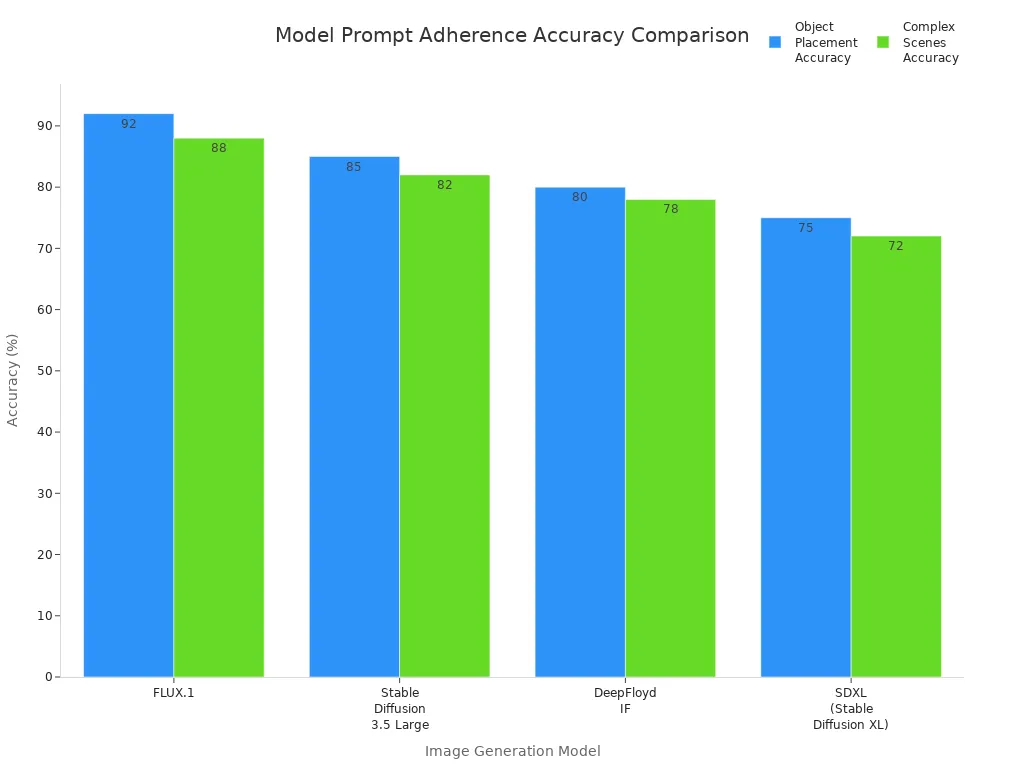
You can see gpt does best with object placement and scene accuracy. This means your pictures match your ideas more closely. You get results you can count on every time.
Editing Precision
When you edit pictures, you want to change small things but keep the rest the same. gpt image 1.5 gives you more control. You can fix faces, clothes, or tiny details. The model keeps everything in the right place. If you need to change a smile or fix a logo, the ai keeps the rest of the picture the same. This helps you keep your subject’s look, which is important for portraits or products.
You also get better words on your pictures. The model works with hard layouts, so you can make posters or infographics with lots of words. Your pictures stay clear and easy to read. Many people use this for ads, product pictures, and online stores. The model keeps brand colors and logos, so your pictures look good every time.
Tip: Use the mask tool to edit just one part of your picture. You do not have to start over. This saves time and keeps your results the same.
Workflow Enhancements
You want to finish your work faster and with less trouble. gpt image 1.5 makes pictures four times faster than before. You can go from idea to finished picture in minutes. The editing tools let you make small changes, so you spend less time fixing mistakes.
Here are some ways this upgrade helps your work:
- Faster picture making lets you try more ideas and pick the best.
- The ai helps you make and edit pictures, so you do not need other tools.
- You get the same good results every time, so your work looks great.
- The model helps with pictures that have lots of words, so you can make posters or ads easily.
Many people say these changes save them hours. You get better tools, more steady results, and an easier way to create. If you want to work faster and better, this model is for you.
With gpt image 1.5, every part of your work gets better. The model gives you real-looking pictures, good editing, and fast results. You can trust the ai to help you make great images every time.
User Experiences with Generated Images
Positive Reviews and Success Stories
You might wonder what other users think about gpt image 1.5. Many people say this model changed how they create. You can see lots of happy stories from users who tried the new image tools. One user shared, “I made a poster for my school club. The words looked perfect, and the colors matched our theme. I finished it in minutes!” Another user said, “I needed a product image for my online shop. gpt gave me a photo that looked real. My friends could not tell it was ai.”
Here are some things users love:
- The image quality looks sharp and real.
- You can add lots of text, and it stays clear.
- Editing small parts of the image is easy.
- The ai helps you match your ideas fast.
Note: Many users say gpt image 1.5 makes their work look professional, even if they are just starting out.
Common Critiques and Solutions
You may run into some problems with generated images. Some users noticed a yellow tint in older versions. Others said details sometimes looked off. With gpt image 1.5, you get better lighting and more detail. If you see a problem, try using the mask tool to fix just one part of the image. This saves time and keeps your work looking good.
Here’s a quick table of common issues and how you can solve them:
You can trust gpt to help you fix most problems. The ai learns from feedback, so each update gets better. If you want great images, gpt image 1.5 gives you tools that work.
Comparing GPT Image 1.5 to Alternatives
Versus Google's Nano Banana Pro
You might wonder how gpt image 1.5 stacks up against other big names. Many creators compare it to Google’s Nano Banana Pro. Both models make high-quality images, but you will notice some differences when you use them.
- Nano Banana Pro often gives you images that feel more real and personal. This comes from the way the model learned from lots of everyday photos.
- gpt image 1.5 sometimes looks more polished, almost like stock photos. This can be great for ads or clean designs.
- If you want to edit or create images, users say Nano Banana Pro feels easier and gives better results for tricky changes.
- On speed, gpt image 1.5 wins. You get your image faster, which helps when you need to try many ideas. The difference in speed is small, but you will notice it if you work a lot.
- Nano Banana Pro still leads in accuracy and advanced edits, but gpt image 1.5 has closed the gap compared to older versions.
Here’s a quick table to help you see the main points:
Unique Advantages of GPT on karavideo.ai
You get some special perks when you use gpt on karavideo.ai. The model stands out for making images with lots of text. If you need posters, ads, or infographics, this ai tool keeps your words sharp and easy to read. Other models often mix up letters or blur the text, but gpt image 1.5 gets it right.
- You can add long sentences or brand names, and the model keeps them clear.
- The ai helps you edit just one part of your image without changing the rest.
- You get fast results, so you can try more ideas in less time.
Many creators say this model gives them more control and better results for projects that need both pictures and words. If you want your image to match your vision, gpt on karavideo.ai makes it simple.
Tips for Creators Using GPT Image 1.5
Best Practices
You want your images to look their best with gpt image 1.5. Here are some simple tips to help you get great results every time:
- Be Specific: Tell the model exactly what you want in your image. Name the main subject, setting, and objects.
- Avoid Vague Prompts: Skip words like "nice scene" or "cool design." Use clear and concrete details.
- Use Descriptive Adjectives: Add words about texture, lighting, and color. This helps the model match your vision.
- Include Perspective: Say if you want a "top-down" or "close-up" view. This controls how your image looks.
- Define the Mood: Use words like "serene," "dramatic," or "vibrant" to set the feeling of your image.
Tip: Try different prompts and see which one gives you the image you like most. Sometimes a small change in words makes a big difference.
Leveraging karavideo.ai Tools
You can do more with your images when you use the tools on karavideo.ai. The platform gives you smart features for both creating and editing. Here’s a table with some strategies to help you get the most out of your work:
You can use the mask tool for editing just one part of your image. This saves time and keeps the rest of your work safe. If you want to make posters or ads, gpt image 1.5 helps you add clear text and keep your design sharp. The editing tools let you fix small things fast, so you do not have to start over.
Note: The more you use these tools, the easier it gets to make images that match your ideas.
You can see why many creators like gpt image 1.5 on karavideo.ai this year. The model makes sharp pictures, lets you edit fast, and gives you clear words. More people now say good things about it, and fewer people have problems. Negative reviews went down from 9% to 5%. You can fix pictures better, spend less money, and keep your brand looking right. OpenAI keeps making updates and listens to what users say, so the tool gets better all the time. Try it for your next project and see how simple it is to make something great!
FAQ
How fast can you make an image with GPT Image 1.5?
You can get your image in just a few seconds. The model works quickly, so you do not have to wait long. Try different prompts and see results almost right away.
Can you add lots of text to your images?
Yes! You can add long sentences, brand names, or even paragraphs. The words stay sharp and easy to read. This works great for posters, ads, or infographics.
What if you want to edit just one part of your picture?
Use the mask tool. You can pick the area you want to change. The rest of your image stays the same. This saves you time and keeps your work looking neat.
Does GPT Image 1.5 work for beginners?
Absolutely! You do not need special skills. The tools feel simple and easy to use. Just type what you want, and the AI helps you create something cool.