Your Ultimate Guide: How to Use SeeDance 1.5 Pro
This guide will walk you through everything you need to know about how to use SeeDance 1.5 Pro, from its groundbreaking features to advanced tips that will transform your conten
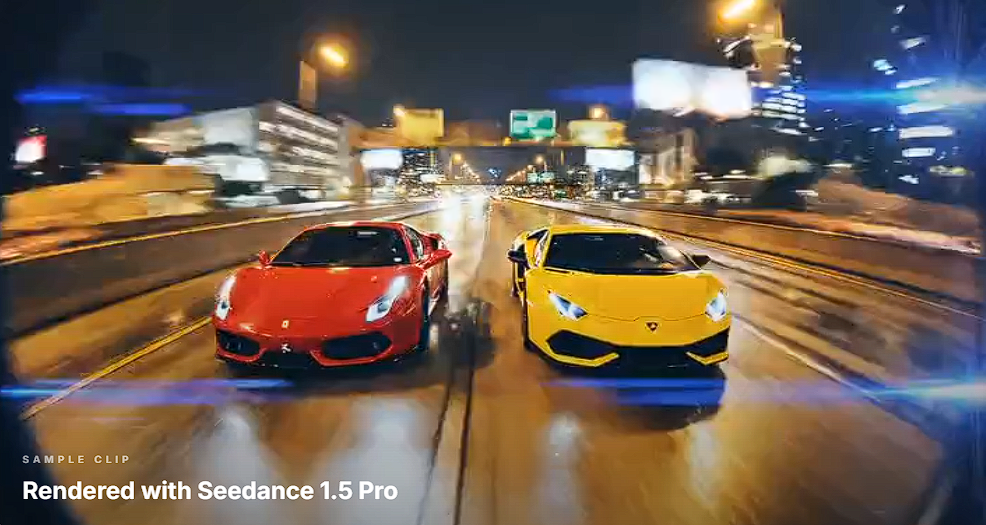
Unlock a new dimension of video creation where your vision comes to life with unparalleled ease and power. With the launch of SeeDance 1.5 Pro, video editing is no longer just about cutting and splicing; it’s about infusing your projects with rich, AI-generated audio that perfectly complements your visuals. This guide will walk you through everything you need to know about how to use SeeDance 1.5 Pro, from its groundbreaking features to advanced tips that will transform your content. Whether you're a seasoned professional or just starting, prepare to elevate your video creation process.
What is SeeDance 1.5 Pro?
SeeDance 1.5 Pro is a revolutionary video model integrated into the KaraVideo.ai platform. Its core philosophy is simple yet powerful: "human performance at the core, AI for creative empowerment." This means you can take your existing video footage and modify it with incredible fidelity, all without needing to reshoot.
The standout feature of SeeDance 1.5 Pro is its groundbreaking "Automatic Video Dubbing and Sound Effect Generation" capability. This isn't just about adding a background track. The model analyzes your video and intelligently generates a complete soundscape, including:
· Environmental Sounds: Realistic ambient noises that match the on-screen action perfectly.
· Dialogue and Voiceovers: Clear, emotionally resonant human voices, with strong support for various languages and dialects, especially Chinese.
· Music and Scores: Background music that sets the mood and enhances the narrative tone of your video.
· Sound Effects: Precisely timed effects that add impact and realism.
This "sound and picture in one" approach streamlines the creative process, allowing you to produce fully immersive videos faster than ever before. It’s a complete audio-visual creation experience packed into one intuitive tool.
Key Audio Features That Will Change Your Workflow
The audio capabilities of SeeDance 1.5 Pro are what truly set it apart. Let’s explore the core highlights that make this model a must-have for any creator.
Flawless Environmental Audio Integration
Have you ever spent hours searching for the perfect ambient sound for a scene? With SeeDance 1.5 Pro, that struggle is over. The model automatically generates environmental audio that is not just fitting but feels completely natural. The sounds of a bustling city, a quiet forest, or a crowded cafe are generated to match your visuals, creating a believable and immersive world for your audience without any jarring or out-of-place noises.
Powerful Language and Dialect Generation
Communication is key, and SeeDance 1.5 Pro excels at generating human speech. It has a strong command of various languages and dialects, delivering dialogue that is clear and authentic. Its performance with Chinese-language voice commands is particularly exceptional, allowing for precise and nuanced vocal generation that captures the intended tone and meaning.
Authentic Emotional and Vocal Performance
AI-generated voices often sound robotic, but SeeDance 1.5 Pro breaks that mold. The model delivers vocal performances that are rich with emotion. Whether you need a character to sound excited, somber, or surprised, the AI interprets your prompts to create speech that is genuinely expressive and true to the character's state. It even handles vocal imitations and onomatopoeia with natural flair.
Mood-Matching Background Music (BGM)
Music is the soul of a video. SeeDance 1.5 Pro analyzes the tone of your footage and generates a background score that enhances the atmosphere. From a tense thriller to a lighthearted comedy, the BGM style and ambient sound effects align perfectly with the video’s mood, amplifying its emotional impact.
Precise Lip-Sync and Audio-Visual Synchronization
One of the biggest challenges in video production is ensuring audio and video are perfectly synced. SeeDance 1.5 Pro boasts impressive lip-sync accuracy, ensuring that generated dialogue matches the on-screen mouth movements precisely. This high level of audio-visual synchronization eliminates the distracting disconnect found in poorly dubbed content, resulting in a professional and polished final product.
Setting Up: A Step-by-Step Guide
Getting started with SeeDance 1.5 Pro is straightforward. As part of the KaraVideo.ai ecosystem, it's designed for efficiency. Here’s how you can begin your journey into AI-powered video and audio creation.
Step 1: Access the KaraVideo.ai Platform
Your first step is to log in to your KaraVideo.ai account. If you don't have one, you can sign up on the official website. The platform is web-based, so there's no need for complex software installations. You get seamless access to a suite of powerful video creation tools, including SeeDance 1.5 Pro, all from a single dashboard.
Step 2: Navigate to the SeeDance 1.5 Pro Model
Once you're in the dashboard, you will find the video creation workspace. KaraVideo.ai offers various AI models, each with unique strengths. To access the audio-visual magic, select SeeDance 1.5 Pro from the list of available models. This will load the specific interface designed for its advanced capabilities.
Step 3: Upload Your Base Video
With the model selected, it's time to provide the visual foundation for your project. You can upload a video clip directly from your computer. This clip is the "human performance" core that the AI will enhance. The platform supports common video formats, making it easy to import your existing footage.
Step 4: Craft Your Text Prompt
This is where your creative direction comes into play. You will see a text box where you can describe the audio you want to generate. This is the heart of learning how to use SeeDance 1.5 Pro effectively. Your prompt tells the AI what to create, from the dialogue and sound effects to the overall mood of the music. Be as specific or as general as you like—the model is designed to interpret a wide range of creative inputs.
Step 5: Generate and Review
After crafting your prompt, click the "Generate" button. The AI will process your video and your text instructions to create a new version complete with a fully synthesized audio track. The generation time will vary depending on the length and complexity of your video. Once complete, you can preview the result directly in the platform. You can then download the final video or continue refining it with new prompts.
How to Use SeeDance 1.5 Pro: Key Functionalities
Now that you're set up, let's dive into the core functionalities. Mastering these will allow you to harness the full creative potential of the model.
Generating Dialogue and Voiceovers
Creating spoken words is one of the most powerful features. You can add narration to a documentary, create dialogue between characters, or add a simple voiceover to a marketing video.
How to Do It:
1. Upload your video showing a person speaking or a scene that needs narration.
2. In the text prompt, describe the dialogue. Use quotation marks to specify the exact words you want spoken.
3. You can also guide the emotional tone. For example: A man says excitedly, "This is incredible!" or A woman whispers, "We have to be quiet."
4. If your video features multiple people, you can assign dialogue. For instance: Man 1: "Where are we going?" Woman 1, smiling: "It's a surprise."
The AI will generate the speech, paying close attention to lip movements in the video for accurate synchronization.
Creating Immersive Environmental Sounds
Ambient sound is crucial for making a scene feel real. SeeDance 1.5 Pro can build this layer for you automatically.
How to Do It:
1. Upload a video of a specific environment (e.g., a beach, a busy street, a library).
2. In your prompt, describe the sounds you want to hear. Be descriptive. Instead of just "city sounds," try The sounds of a busy New York street with cars honking, distant sirens, and the chatter of pedestrians.
3. You can also layer sounds. For example: Rain falling on a window pane, with the soft crackle of a fireplace in the background.
The model will generate a rich soundscape that brings your static scene to life.
Adding Background Music and Sound Effects
Music and sound effects dictate the emotional journey of your video. SeeDance 1.5 Pro gives you director-level control over this process.
How to Do It:
1. For Music: Specify the genre, mood, or instruments. For example: An epic orchestral score for a dramatic reveal, A gentle, acoustic guitar melody for a heartfelt moment, or Upbeat electronic music for a tech product promo.
2. For Sound Effects (SFX): Describe the specific sounds you need and when they should occur. The AI is smart enough to often sync these with on-screen actions. You can guide it with prompts like: A sudden whoosh sound as the car speeds by, or The clinking of glasses as two people toast.
3. Combining Music and SFX: You can request both in a single prompt. For example: Suspenseful violin music builds as a door creaks open.
This functionality eliminates the need for separate audio libraries and editing software, integrating the entire sound design process into one simple step.
Tips and Tricks for Maximizing Your Results
Knowing how to use the features is one thing; mastering them is another. Here are some tips and tricks to get the most out of SeeDance 1.5 Pro and produce truly stunning content.
1. Be Specific and Descriptive in Your Prompts
The quality of your output is directly related to the quality of your input. The AI is powerful, but it's not a mind reader. The more detail you provide in your prompts, the closer the result will be to your vision.
· Weak Prompt: Add sound.
· Strong Prompt: A young woman's voice narrates thoughtfully. Gentle piano music plays in the background. We hear the soft chirping of birds outside.
Use adjectives to describe mood (e.g., tense, joyful, melancholy) and adverbs to describe actions (e.g., speaking softly, laughing loudly).
2. Use Prompt Structures for Complex Scenes
For videos with multiple audio elements, structure your prompts for clarity. Using brackets or descriptive tags can help the AI differentiate between various audio components.
Example Prompt Structure:
[Music: A low, suspenseful synthesizer drone throughout the clip.][Dialogue: Man's voice, whispering: "Did you hear that?"][SFX: A floorboard creaks loudly, followed by the sound of a distant dog barking.]
This organized approach helps the model understand the layers of sound you want to create, leading to a more complex and professional audio mix.
3. Leverage Negative Prompts to Exclude Unwanted Sounds
Sometimes, what you don't want is just as important as what you do want. If the AI is generating a sound you wish to remove, you can use a negative prompt to guide it. While not an official feature, phrasing your request to exclude certain elements can be effective.
Example: A quiet library scene. The only sounds are the turning of pages and a soft cough. No music, no talking.
This tells the model to focus only on the specific sounds you've requested and avoid adding extra, unwanted audio like a background score.
4. Iterate and Refine
Your first generation might not be perfect, and that's okay. The creative process is often iterative. Use the first output as a baseline. If the music is too loud or the dialogue's emotion is slightly off, adjust your prompt and generate again.
Example Iteration:
· Prompt 1: A man talks about his product.
· Result 1: The voice is too monotone.
· Prompt 2 (Refined): An energetic and enthusiastic man speaks excitedly about his new product. Upbeat, motivational music in the background.
Small changes in your prompt can lead to significant improvements in the final audio. Don't be afraid to experiment.
5. Mind the Source Video Quality
The principle of "garbage in, garbage out" applies here. While SeeDance 1.5 Pro can work wonders, it performs best with clear, high-quality video. For features like lip-syncing, ensure the speaker's face and mouth are clearly visible. A well-lit, stable shot will yield much better results than a dark, shaky one. The AI uses visual cues from your video to inform its audio generation, so give it the best possible material to work with.
6. Experiment with Different Languages and Accents
Push the boundaries of the model's language capabilities. If your content targets a global audience, try generating dialogue in different languages. You can also experiment with requesting specific accents to add authenticity to your characters.
Example: A man with a British accent says, "Welcome to our grand opening!"
This is an excellent way to create localized content without hiring multiple voice actors, all within the KaraVideo.ai platform.
The Future of Video is Here: The Benefits of SeeDance 1.5 Pro
Integrating SeeDance 1.5 Pro into your creative workflow isn't just about using a new tool; it's about embracing a fundamental shift in how video content is made. The benefits are clear and transformative.
1. Unprecedented Efficiency: The most significant advantage is the incredible time savings. The entire process of sound design, voiceover recording, music sourcing, and final mixing, which traditionally takes days or even weeks, can now be accomplished in minutes. This allows creators and businesses to produce high-volume, high-quality content at a scale that was previously unimaginable.
2. Drastically Reduced Costs: Think of the expenses associated with traditional video production: hiring voice actors, licensing music tracks, booking recording studios, and paying sound engineers. SeeDance 1.5 Pro consolidates all these roles into a single, cost-effective solution. This makes professional-grade audio accessible to everyone, from independent creators to large enterprises.
3. Boundless Creative Empowerment: You are no longer limited by your budget or your technical skills in audio engineering. If you can imagine a soundscape, you can create it with a simple text prompt. This freedom empowers you to experiment with bold creative ideas, knowing that the tool can bring them to life. The AI acts as your creative partner, enhancing your vision without constraints.
4. Consistency and Quality: The model delivers consistently high-quality audio that is perfectly synchronized with your video. This eliminates the technical hurdles of audio mixing and sync, ensuring a polished and professional final product every time. For brands and businesses, this means maintaining a consistent level of quality across all video content.
By providing a unified platform for both video and audio creation, KaraVideo.ai is pioneering a new era of content production. Models like SeeDance 1.5 Pro are not just tools; they are enablers of creativity, efficiency, and innovation.
You now have a comprehensive understanding of how to use SeeDance 1.5 Pro. It's time to stop just editing videos and start creating fully immersive audio-visual experiences. Log in to KaraVideo.ai, select SeeDance 1.5 Pro, and unleash your creativity. The future of video creation is at your fingertips.