How to Use Body Swap AI: The Complete Guide for Creators
Learn how to use Body Swap AI for stunning videos and images. Discover the best tools, a full tutorial, and why karavideo.ai leads the pack.
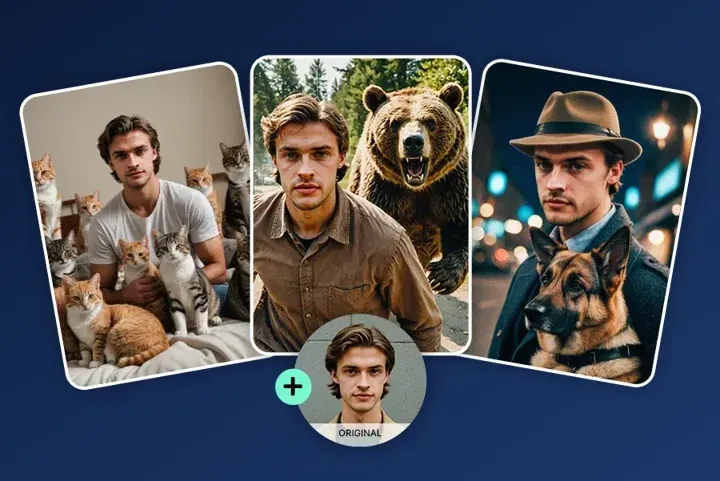
Have you ever watched a viral video where someone instantly changes outfits or transforms into a completely different character and wondered, "How did they do that?" It wasn't magic, and it probably wasn't a million-dollar Hollywood budget either. It was likely Body Swap AI.
For content creators, marketers, and digital artists, the landscape of visual editing is shifting fast. What used to take hours of green screen work and frame-by-frame rotoscoping can now be achieved in minutes. Whether you are looking to create engaging social media content, test fashion looks without a physical photoshoot, or simply have fun with memes, learning how to use Body Swap AI is your ticket to effortless content creation.
In this guide, we’ll break down exactly what this technology is, how it works, and provide a foolproof step-by-step tutorial. Plus, we’ll dive into the tools of the trade, comparing the top players in the market—including the powerhouse platform, karavideo.ai—to help you choose the right engine for your creative needs.
What Is Body Swap AI?
Body Swap AI is a specialized application of generative artificial intelligence designed to replace the body of a subject in a video or image with another, while often retaining the original head or face. Alternatively, it can swap a face onto a different body. It uses deep learning algorithms to analyze the geometry, lighting, and movement of the source footage.
Think of it as a digital costume change on steroids. Unlike simple "face swap" apps that just paste a face onto a static image, advanced Body Swap AI handles complex video data. It tracks movement, adjusts skin tones, and blends edges to make the swap look natural and realistic.
The Tech Behind the Magic
At its core, this technology relies on:
- Pose Estimation: The AI identifies the skeletal structure of the person in the video to understand movement.
- Segmentation: It separates the subject from the background and the head from the body.
- Generative Adversarial Networks (GANs): These networks generate new pixels that match the target body or outfit, ensuring the lighting and texture blend seamlessly with the original footage.
The result? You can take a video of yourself dancing in pajamas and use AI to swap your outfit for a tuxedo, a superhero suit, or high-fashion runway gear—all without leaving your living room.
Why Use Body Swap AI? Top Applications
The applications for this technology are exploding across industries. It’s not just for funny TikTok filters anymore; it’s a serious tool for efficiency and creativity.
1. E-Commerce and Fashion
Online retailers are using Body Swap AI to showcase clothing on diverse models without hiring dozens of people for a photoshoot. You can take one mannequin shot and swap it onto models of different ethnicities, sizes, and poses. This drastically reduces production costs while increasing representation.
2. Social Media Content Creation
Creators need to churn out content constantly. With Body Swap AI, you can film one "base" video and generate multiple versions with different outfits or characters. This is perfect for skits, storytelling, or reacting to trends where visual variety keeps the audience engaged.
3. Film and Pre-Visualization
Indie filmmakers use these tools for storyboarding. Instead of hiring actors for a test shoot, directors can swap characters into scenes to visualize the final look before committing to expensive production days.
4. Privacy and Anonymity
In sensitive interviews or documentaries, body and face swapping can be used to protect a subject's identity while preserving their body language and expressions, which offers a more human connection than simply blurring the face.
How to Use Body Swap AI: A Step-by-Step Guide
Ready to try it yourself? While different platforms have slightly different interfaces, the general workflow remains consistent. We will focus on a general approach that applies to most top-tier tools, including karavideo.ai.
Step 1: Choose Your Platform
Your first step is selecting the right tool. You want a platform that offers high-resolution output, intuitive controls, and fast rendering. (We will compare the best options later in this article!)
Step 2: Prepare Your Source Footage
The quality of your AI output depends heavily on your input.
- Lighting: Ensure your subject is well-lit. Shadows across the body can confuse the AI.
- Clothing: Wear form-fitting clothes if possible. Baggy clothes make it harder for the AI to estimate body shape.
- Background: A clean background helps the AI separate the subject, though advanced tools like karavideo.ai handle complex backgrounds surprisingly well.
Step 3: Upload Your Media
Log in to your chosen dashboard. You will typically see an option to "Upload Video" or "Upload Image." Select the file you want to transform.
Step 4: Define the Swap
This is where the creativity happens. You usually have two options:
- Preset Library: Choose from the platform's library of bodies, outfits, or characters.
- Custom Upload: Upload a reference image of the body or outfit you want to swap onto your subject.
Pro Tip: If you are swapping outfits, try to match the angle of the reference image to the angle of your subject in the video for the most realistic results.
Step 5: Configure Settings
Look for settings that allow you to refine the output. You might see options for:
- Enhance Face: Ensures the facial features remain sharp after the swap.
- Skin Tone Matching: Automatically adjusts the body's skin tone to match the face.
- Stability: Increases the consistency of the swap across video frames to reduce flickering.
Step 6: Generate and Preview
Hit the "Generate" button. Depending on the length of your video and the server speed, this could take a few seconds to a few minutes. Most platforms will let you preview a short clip before processing the full file.
Step 7: Download and Edit
Once you are happy with the result, download the video. You can then import it into your favorite video editor (like Premiere Pro or CapCut) to add music, text, and effects.
Market Comparison: Finding the Best Tool
With so many AI tools popping up, choosing the right one can feel overwhelming. We’ve analyzed three major contenders in the space to help you decide. We will look at karavideo.ai, Reface, and DeepSwap.
1. karavideo.ai
Best For: Professional creators, marketers, and anyone needing high-fidelity video swaps.
Overview:
karavideo.ai stands out as a comprehensive video generation platform. It isn't just a "swap" tool; it's a creative suite. It aggregates the world’s best video engines into one dashboard, giving you unprecedented control.
Key Features:
- Multi-Model Access: Unlike competitors that rely on a single algorithm, karavideo.ai gives you access to 40+ AI-powered effects and models. You can choose the specific model that works best for your footage.
- Seamless Interface: The user experience is designed for speed. Describe → pick model → generate. No tool-hopping, no setup overhead.
- High Precision: The platform excels at edge detection, meaning the "seams" between the head and the swapped body are virtually invisible.
- One Dashboard: You get seamless access to the world’s best video engines—all from one dashboard with one price. This is a massive cost-saver compared to subscribing to multiple niche tools.
Why it Wins:
If you want professional results without the technical headache, karavideo.ai is the superior choice. It bridges the gap between fun consumer apps and high-end production software.
2. Reface
Best For: Casual users, memes, and quick social media fun.
Overview:
Reface is incredibly popular on mobile devices. It’s famous for its ease of use—you snap a selfie and instantly become Jack Sparrow or Iron Man.
Pros:
- Extremely easy to use on mobile.
- Huge library of movie clips and GIFs.
- Fast processing for short clips.
Cons:
- Lower Resolution: The output is often compressed, making it unsuitable for professional work or large screens.
- Limited Control: You can't tweak settings or fine-tune the mask. You get what you get.
- Watermarks: The free and lower-tier versions are heavy on watermarks.
Verdict:
Great for a quick laugh in a group chat, but it lacks the fidelity required for e-commerce or serious content creation.
3. DeepSwap
Best For: Web-based face swapping with a focus on long-form video.
Overview:
DeepSwap is a web-based tool that allows for longer video uploads than many mobile apps. It specializes in face swapping but has capabilities for body merging.
Pros:
- Supports longer video clips.
- Good privacy policies (deletes data after a set period).
- No watermark on paid plans.
Cons:
- Price: Can get expensive for heavy users.
- Speed: Processing long videos can be slow during peak times.
- Learning Curve: Slightly more complex interface than Reface.
Verdict:
A solid middle-ground option, but it lacks the "all-in-one" versatility and model variety that karavideo.ai offers.
Detailed Feature Breakdown: Why karavideo.ai is the Creator's Choice
When you dig into the details, the difference between a generic tool and a professional platform becomes clear. Let's look at why karavideo.ai is rapidly becoming the go-to for creators who want to use Body Swap AI effectively.
Access to Cutting-Edge Models
The world of AI moves fast. New models are released every week. With standalone apps, you are stuck with whatever algorithm they built six months ago. With karavideo.ai, the platform integrates the latest and greatest models as they emerge. This means you are always using the most advanced tech available.
Workflow Efficiency
Time is money. In a typical workflow, you might use one tool to generate an image, another to swap the face, and a third to animate it. karavideo.ai consolidates this. You can free your video creation—start with any text, image, or clip. This unified workflow prevents file corruption and saves hours of transferring files between apps.
Creative Freedom
Most tools lock you into specific templates. karavideo.ai embraces the "generative" aspect of AI. You aren't just swapping; you are creating. You can describe a scene—"cyberpunk street fashion"—and have the AI generate the body and outfit to swap onto your subject.
- Choose from 40+ AI-powered effects to create fun, expressive, and viral-ready videos with just one click.
Cost-Effectiveness
Subscribing to Midjourney for images, Runway for video, and another tool for swapping can cost upwards of $100/month. karavideo.ai bundles access to top-tier engines into one price point. For freelancers and agencies, this ROI is undeniable.
Tips for achieving the Best Results with Body Swap AI
Even the best tool needs a skilled operator. Here are some advanced tips to elevate your body swap content.
1. Mind the Angles
AI is smart, but it struggles with extreme perspective shifts. If your source video is shot from a low angle, but your target body image is eye-level, the result will look "uncanny." Always try to match the camera angle of your source and target.
2. Consistent Lighting
Shadows are the hardest thing for AI to fake. If your face has a strong shadow on the left, but the new body is lit from the right, the composite will look fake. Try to use "flat" or soft lighting for your source video, as it is easier for the AI to relight.
3. Avoid Fast Motion Blur
Motion blur can confuse the tracking algorithms. If you are dancing or moving quickly, shoot at a higher frame rate (like 60fps) and ensure your shutter speed is high enough to keep individual frames crisp.
4. High Resolution is King
Always upload the highest resolution video possible (1080p or 4K). AI needs pixel data to work with. If you feed it a blurry 720p video, the swap will look muddy. karavideo.ai supports high-res uploads to ensure your final export is crisp and professional.
The Future of Body Swap AI
We are just scratching the surface of what's possible. As models improve, we will see real-time body swapping for live streams become accessible to everyone. Imagine streaming a game on Twitch while looking like your in-game character, in real-time, with zero latency.
Furthermore, the integration of text-to-video and body swapping will deepen. Soon, you won't need a reference image at all. You will simply type, "Swap outfit to a vintage 1950s dress," and the AI will generate the physics, fabric texture, and movement on the fly.
Platforms like karavideo.ai are leading this charge by aggregating these advancements into a single, user-friendly interface. By staying part of an ecosystem that evolves, you ensure your content never falls behind the curve.
Frequently Asked Questions
Q: Is Body Swap AI legal?
A: Yes, using AI for creative purposes is legal. However, you must respect copyright laws regarding the source material and privacy laws regarding the subjects. Never use someone's likeness without their permission for commercial gain or defamatory purposes.
Q: Can I use Body Swap AI on a mobile phone?
A: Yes, many tools have mobile interfaces. However, for the highest quality and batch processing capabilities, a desktop browser accessing a powerful cloud platform like karavideo.ai is recommended.
Q: Does it work on animals?
A: Some models are trained on animals, but most are optimized for human anatomy. Results on pets may vary!
Q: How much does it cost?
A: Prices vary. Some apps offer free trials with watermarks. Professional platforms offer subscription models that grant credits for high-quality, watermark-free generation.
Conclusion: Unleash Your Creativity
Body Swap AI is more than a trend; it's a powerful asset in the modern creator's toolkit. It saves time, reduces costs, and opens up creative possibilities that were previously impossible without a Hollywood studio.
Whether you are a marketer looking to A/B test fashion looks, or a YouTuber wanting to spice up your skits, the technology is ready for you. The key is to start with a robust platform that won't limit your potential.
Don't settle for low-res gimmicks. If you are ready to take your content to the next level, explore tools that offer precision and power. Check out karavideo.ai to experience the difference of a professional-grade video engine.
Ready to transform your content?
- Step 1: Visit karavideo.ai and sign up.
- Step 2: Upload your first clip.
- Step 3: Describe your vision and let the AI do the heavy lifting.
The future of video is here. What will you create?