Luma Ray 2 versus Leading AI Video Generators in 2026
Luma Ray 2 gives you a solid choice on the karavideo.ai platform, but picking the right tool means thinking about your goals, your starting point, and your budget.
You want to know if Luma Ray 2 on karavideo.ai stands above the rest in 2026. The answer depends on what you need. Some creators want speed, while others look for control or stunning visuals. Maybe your project calls for quick ai video content, or maybe you want advanced editing tools. Luma Ray 2 gives you a solid choice on the karavideo.ai platform, but picking the right tool means thinking about your goals, your starting point, and your budget.
Key Takeaways
- Luma Ray 2 offers fast, high-quality video output, ideal for short clips and tech demos.
- The platform excels in motion realism and text-to-video generation, making it user-friendly.
- AI video generators like Luma Ray 2 help businesses create content quickly and cost-effectively.
- karavideo.ai provides an easy-to-use interface, suitable for both beginners and professionals.
- Choosing the right AI video generator depends on your specific needs, goals, and budget.
Luma Ray 2 vs. Other AI Video Generators: Quick Comparison
Overall Verdict
You want a clear answer. Is Luma Ray 2 on karavideo.ai the best ai video generator in 2026? If you need fast, high-quality video output for product reels or tech demos, Luma Ray 2 stands out. You get 720p video in about five seconds. That speed makes a big difference when you need results quickly. For short-form content, Luma Ray 2 delivers motion realism and understands text instructions better than most competitors. If you compare it to Kling or Adobe Firefly, you see that each generator has its own strengths. Kling creates longer videos, up to two minutes, and supports more aspect ratios. Adobe Firefly focuses on safety and legal standards, which helps in corporate settings. When you make an apples-to-apples comparison, Luma Ray 2 shines for short, sharp, and realistic video generation.
Tip: If you want to try Luma Ray 2, you can start with a trial on karavideo.ai and see how the results fit your needs.
Key Differentiators
Let’s break down what sets Luma Ray 2 apart from other ai video generators:
- Speed: Luma Ray 2 generates 720p video output in about five seconds. You don’t wait long for your videos.
- Motion Realism: You get strong motion quality thanks to a physics engine. Your short clips look smooth and natural.
- Text-to-Video Generation: Luma Ray 2 understands your instructions and turns them into coherent video content. You can create up to 30-second clips with clear motion and story.
- Best for Product Reels and Tech Demos: If you need the best ai video generator for showcasing products or technology, Luma Ray 2 on karavideo.ai is the top choice.
- Resolution and Quality: While Luma Ray 2 focuses on 720p output, Luma Ray 3 (coming soon to karavideo.ai) will offer Hi-Fi Diffusion for 4K HDR footage and even better realism.
- Comparison Table:
Feature | Luma Ray 2 (karavideo.ai) | Kling 1.6 | Adobe Firefly |
|---|---|---|---|
Speed | ~5 seconds (720p) | ~30 seconds (longer videos) | ~10 seconds (varies) |
Video Length | Up to 30 seconds | Up to 2 minutes | Up to 60 seconds |
Motion Quality | High (physics engine) | Good | Moderate |
Text-to-Video | Yes | Yes | Yes |
Resolution | 720p | 1080p | 1080p |
Best Use Case | Product reels, tech demos | Mood reels, ambient | Commercial/corporate |
Platform | karavideo.ai | Kuaishou | Adobe |
You see that Luma Ray 2 on karavideo.ai leads in speed and motion realism for short-form video generation. Kling works better for longer videos and ambient content. Adobe Firefly fits best in commercial environments where safety and licensing matter most.
If you want to create short, realistic videos with fast output and easy text-to-video generation, Luma Ray 2 on karavideo.ai gives you the edge. You get features that help you produce quality content quickly, and you can always try a trial to see the results for yourself.
Why AI Video Generators Matter in 2026
Value for Creators and Businesses
You live in a world where video shapes how people learn, shop, and connect. In 2026, you see more creators and businesses turning to ai video generator tools to keep up with demand. These tools help you move fast and stay creative. You can use them for many things:
- Rapid prototyping and concept visualization
- Generating stock footage and backgrounds
- Creating effects and transitions
- Producing high-volume content efficiently
You no longer need a big team or expensive gear to make professional videos. With ai, you get results that look polished and modern. Businesses now create personalized content for different audiences. You can reach more people and keep them interested.
Here’s a quick look at how ai video generation changes the game for businesses:
Impact Area | Description |
|---|---|
Efficiency | AI video generators enhance efficiency in video production, allowing for faster content creation. |
Cost Reduction | They reduce costs by minimizing the need for large production teams and expensive equipment. |
Personalized Content at Scale | Businesses can create tailored content for various audiences, improving engagement and satisfaction. |
Essential for Survival | In a fast-paced digital economy, adopting these tools is crucial for maintaining competitiveness. |
You see industries like e-commerce and education using video to engage customers and students. Small businesses now compete with bigger brands because they can make high-quality videos without breaking the bank. The shift to short, impactful visuals means you need the best tools to keep your marketing fresh.
Role of karavideo.ai
karavideo.ai stands out in this new landscape. You get a platform that brings together different ai engines for video generation. The dashboard feels easy to use, even if you’re new to video editing. You can create videos from text, images, or clips, and the output looks sharp. karavideo.ai saves you time by letting you control editing, character consistency, and audio in one place. You don’t need to juggle multiple subscriptions or tools. If you want to see fast results and keep your content on point, karavideo.ai gives you a clear advantage.
Main Competitors in AI Video Generation
Luma Ray 2 on karavideo.ai
You want a video generator that delivers fast results and high video quality. Luma Ray 2 on karavideo.ai gives you quick output, strong motion realism, and easy text-to-video generation. You can create short videos with smooth motion and clear resolution. The platform focuses on features that help you produce content efficiently. If you need the best ai video generator for product reels or tech demos, Luma Ray 2 stands out. You can start with a trial to see how the output fits your needs.
Kling 1.6 Overview
Kling 1.6 offers reliability and subtle character performance. You get videos that often match your prompts on the first try. Users say Kling understands instructions better than Luma Ray 2. You see creative results with nuanced motion and longer video length. Kling works well for mood reels and ambient content. The generator handles character actions with detail, which helps you create engaging videos.
Note: Kling 1.6 is a solid choice if you want consistent results and deeper control over character movement.
Runway Gen-4 Overview
Runway Gen-4 targets power users who want advanced features. You get a range of video generation tools, but some users feel it needs an update to compete with Kling 1.6. Runway Gen-4 supports creative workflows and offers flexible output options. You can experiment with different styles and effects. The platform helps you push the boundaries of ai video generator technology, but you may notice it lags behind Kling in prompt reliability.
Other Notable AI Video Generators
You have many options in the ai video generation market. Here’s a quick comparison of other top competitors:
- Runway – Best for power users, starts at $15
- Kaiber – Best for power users, starts at $5, has a free trial
- Synthesia – Best for enterprises, starts at $29
- HeyGen – Best for SMBs, starts at $0
- ChampSignal – Best for SMBs, starts at $39, has a free trial
- D-ID – Best for mid-market companies, starts at $14.4, has a free trial
- Colossyan – Best for SMBs, starts at $19, has a free trial
- DeepBrain AI – Best for SMBs, starts at $29, has a free trial
You can choose the best platform based on your budget, desired features, and video quality needs. Each generator offers unique strengths for different types of content and generation workflows.
Feature Comparison: Luma Ray 2 and Competitors
Video Quality and Realism
You want your videos to look real and sharp. When you compare video quality, you see some clear differences:
- Luma Ray 2 gives you impressive video quality and realism. The advanced physics engine helps create realistic interactions.
- Kling 1.6 offers good quality at 1080p. It uses advanced physical mechanics, but the realism does not match Luma Ray 2.
- Runway Gen-4 struggles with visual fidelity and realism. It scores lower in quality metrics.
If you want the best ai video generator for lifelike results, Luma Ray 2 stands out. You get videos that look natural and engaging.
Motion and Continuity
Smooth motion makes your content feel professional. Luma Ray 2 uses a physics engine to keep motion fluid and logical. Kling 1.6 also does well with motion, but sometimes the results feel less real. Runway Gen-4 falls behind in motion quality and continuity. You may notice jumps or odd transitions in the output. If you need videos with strong motion and clear event sequences, Luma Ray 2 leads the pack.
Customization and Editing
You want control over your video. Luma Ray 2 lets you use detailed prompts for text-to-video generation. You can create accurate characters and scenes. Kling 1.6 gives you some editing tools, but not as many options for deep customization. Runway Gen-4 supports creative workflows, but you may find the editing tools less intuitive. If you want to test these features, try a trial to see which generator fits your workflow.
AI Capabilities and Innovation
Luma Ray 2 brings new features to the table. Here’s a quick comparison:
Feature | Description |
|---|---|
Advanced Cinematography | High-quality, realistic videos with logical event sequences |
Natural Language Processing | Detailed prompts create accurate characters and scenes |
Multi-modal Architecture | Seamless integration of text and images for better video generation |
Photorealistic Visuals | Lifelike and visually appealing output |
Smooth Motion | Natural and fluid motion in every video |
Eye-catching Drama | Engaging scenes that grab attention |
You get advanced ai features that help you create the best content. Luma Ray 2 pushes the limits of what an ai video generator can do. However, you may still see some limitations, like occasional artifacts or a focus on text-to-video only. As the technology grows, you can expect even better results in future versions.
Technical Performance of AI Video Generators
Speed and Rendering
You want your video fast. In 2026, speed matters more than ever. Luma Ray 2 on karavideo.ai gives you quick output, but the next version, Luma Ray 3, pushes things even further. You can see how different platforms compare in the table below:
Platform | Average Queue Time | Average Render Time | Resolution |
|---|---|---|---|
Luma Ray 3 | Under 2.0 minutes | Fast | 4K |
Runway Gen-3 Alpha Turbo | 1.8 minutes | 1.7 minutes | 1080p |
Sora 2 Pro | 3.2 minutes | 2.1 minutes | 1080p |
If you need the best speed for high-resolution video, Luma Ray 3 leads the pack. You get 4K generation in less time than most competitors need for 1080p. That means you spend less time waiting and more time creating.
Stability and Reliability
You want your videos to look smooth and consistent. Luma Ray 2 on karavideo.ai stands out for stability and reliability. Here’s what you get:
- Stable visual coherence in motion
- Best-in-class gravity, momentum, and collision simulation
- Minimal flickering and consistent frame transitions
- 95% accuracy in object trajectory prediction
- 90% real-world physics compliance in most scenarios
You can trust your results to look professional. One e-commerce brand used Luma Ray 2 Flash to make over 50 product showcase videos in under three hours. Their A/B tests showed a 36% higher click-through rate on Ray-generated ads compared to static images. That’s real impact.
Supported Formats
You need flexibility in your video projects. Luma Ray 2 on karavideo.ai supports popular formats for easy sharing and editing. You can export your videos in MP4 for social media or use higher-quality MOV files for professional work. The platform keeps up with the latest standards, so your output always fits your needs.
Tip: Always check your platform’s supported formats before starting a big project. That way, you avoid surprises and keep your workflow smooth.
User Experience and Usability
Interface and Ease of Use
When you use Luma Ray 2 on karavideo.ai, you notice how easy it feels to get started. The interface looks clean and simple. You can type your ideas and see video output in seconds. You do not need to learn complicated prompt tricks. The platform makes ai video generation feel natural. You just enter your text and watch the results appear. Many users say this is the best part of Luma Ray 2. You do not waste time figuring out menus or settings. The table below shows what users like most about the interface:
What Users Like About Luma Ray 2 | Why It Matters |
|---|---|
Conversational interface | You interact like you chat |
Fast video output | You get results quickly |
Intuitive design | You learn it in minutes |
Learning Curve
You do not need to be an expert to create videos with Luma Ray 2 on karavideo.ai. The learning curve feels gentle. You can start making videos right away. If you have used other ai tools, you know some platforms ask for complex prompts or technical skills. Luma Ray 2 removes that barrier. You focus on your ideas, not on how to use the generator. This helps you get the best results, even if you are new to ai video generation.
Support and Community
You get more than just a tool when you join karavideo.ai. The support and community make your experience better. Here is what you find:
- Active forums where you share your videos and get feedback.
- Friendly support that answers your questions fast.
- A creative space for collaboration and learning.
- Opportunities to train and publish your own ai models.
- Ways to earn money from your video output and creative work.
You feel part of a group that helps you grow. The community encourages you to try new things and improve your results. If you want the best support and a place to learn, karavideo.ai gives you that advantage.
Pricing and Value Comparison
Subscription Models
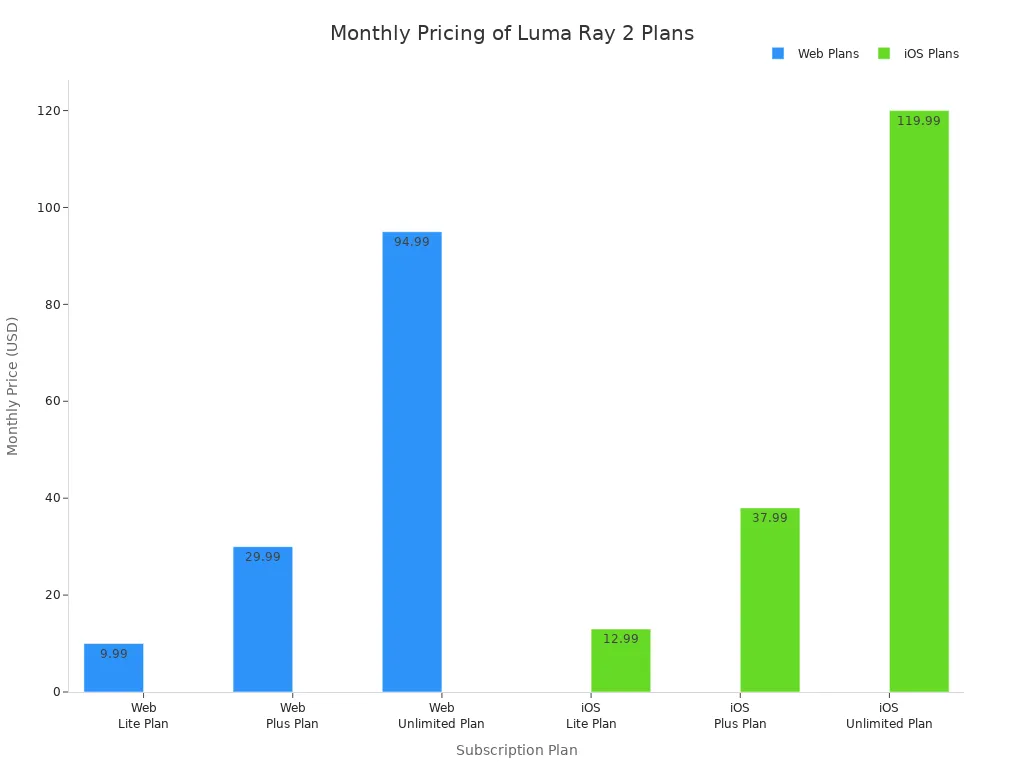
When you look at Luma Ray 2 on karavideo.ai, you see a range of subscription models. You can start with a free plan if you want to test the video output. The Lite and Plus plans give you more credits and higher resolution. The Unlimited plan is for heavy users who need fast, commercial video generation. Here’s a quick look at the web and iOS plans:
Plan Type | Monthly Price | Annual Price (20% off) | Monthly Credits | Features |
|---|---|---|---|---|
Web Free Plan | N/A | N/A | Limited | Non-commercial use, watermarks, 720p images |
Web Lite Plan | $9.99 | $7.99 | 3200 | Non-commercial use, watermarks, 4k access |
Web Plus Plan | $29.99 | $23.99 | 10,000 | Commercial use, no watermarks, HDR access |
Web Unlimited Plan | $94.99 | $75.99 | 10,000 (Fast) | Commercial use, no watermarks, unlimited credits |
iOS Free Plan | N/A | N/A | 250 | Non-commercial use, watermarks, draft images |
iOS Lite Plan | $12.99 | $10.39 | 3200 | Non-commercial use, watermarks, 4k access |
iOS Plus Plan | $37.99 | $30.39 | 10,000 | Commercial use, no watermarks, HDR access |
iOS Unlimited Plan | $119.99 | $95.99 | 10,000 (Fast) | Commercial use, no watermarks, unlimited credits |
You can also see the price differences in this chart:
Cost Across Platforms
When you compare Luma Ray 2 on karavideo.ai to other platforms, you notice some differences. Synthesia offers better value for long videos, but Luma Ray 2 gives you cheaper creative clips than hiring a VFX artist. If you want high-resolution video, Luma Ray 2’s Plus and Unlimited plans give you HDR and 4K output. Many users find that the price matches the quality, especially for short, realistic videos.
Value for Money
You want the best results for your money. Luma Ray 2 on karavideo.ai stands out for realistic visuals and advanced motion control. You get high-fidelity video generation that works well for product demos, ads, and tech showcases. If you need 50 creative clips, the price is much lower than hiring a professional. Luma Ray 2 is the right choice when you care about visual accuracy and smooth output. For large-scale video projects, you get strong value, especially if you use the Unlimited plan.
Tip: If you want to try before you buy, start with the free plan on karavideo.ai and see if the results fit your needs.
Unique Innovations and Future Trends in AI Video Generation
Luma Ray 2 Innovations
You want to know what makes Luma Ray 2 stand out as the best ai video generator in 2026. This tool brings a fresh set of features to the table. You can see how it leads the market in the table below:
Feature | Description |
|---|---|
Text to Video | Converts detailed written prompts into animated video clips with depth, motion, and scene changes. |
Image to Video | Animates still images into brief videos with natural motion and enhanced visuals. |
Cinema-Level Motion and Physics | Understands object movement, lighting, and physics for realistic action and transitions. |
HDR and Professional-Grade Output | Delivers native HDR video with richer contrast and deeper visual detail for commercial use. |
Reasoning and Planning | Interprets prompts intelligently to produce sequences with narrative coherence. |
Cloud-Based Access | Allows creators to generate content directly from their browser or via API integration. |
You get more than just high resolution or fast output. Luma Ray 2 uses advanced ai to understand your prompts and deliver videos with real motion and story. The generator’s reasoning skills help you create content that feels planned, not random. If you want to try these features, you can start with a trial on karavideo.ai.
Advances from Competitors
You see other platforms pushing the limits of ai video generator technology. Here’s a quick comparison of what the top competitors offer:
Competitor | Key Features |
|---|---|
OpenAI Sora | Sets the benchmark for realistic text-to-video generation, producing coherent, high-definition scenes. |
Kling | Excels in expressive detail and longer-form content, generating high-definition videos with complex physics. |
Google Veo | Allows for specific requests like timelapses, generating coherent 1080p videos with character consistency. |
Runway | Combines text-to-video generation with a suite of editing tools for comprehensive video creation. |
Each generator brings something unique. Some focus on expressive detail, while others give you more editing power. This comparison helps you pick the best tool for your needs.
What’s Next for AI Video Generators
You might wonder where ai video generation goes from here. The next wave of innovation will focus on models that understand space, logic, and time. You will see ai that reasons through your prompts and creates video sequences with true narrative flow. Training across language, image, and video data will build unified models that move from simple generation to real understanding. You can expect even higher quality, more control, and smarter results. The future looks bright for anyone who wants to create the best videos with ai.
Choosing the Best AI Video Generator for Your Needs
For Professionals
If you work as a professional video editor or filmmaker, you want tools that deliver sharp output and flexible control. You need a generator that matches your creative vision and keeps up with your workflow. Here are some top choices:
- Sora 2 gives you versatility in style. You can use it for previsualization, safety scenarios, and even one-click short films with sound and narrative flow.
- Lummi video generator helps you organize material into cohesive videos. The process feels intuitive and aligns with your ideas.
- PixVerse V5 stands out for speed and visual sharpness. You get smooth, expressive motion and film-worthy image clarity.
- Kling 2.5 Turbo offers power and speed. You get film-grade aesthetics, advanced camera control, and realistic motion.
You can rely on these tools to produce professional results. Each one supports high-quality video generation and helps you meet tight deadlines.
For Businesses and Marketers
Running a business or managing marketing means you need fast, adaptable video solutions. The best platforms offer features that save time and help you reach new markets:
- Social media managers and content creators benefit from integrated AI-powered editing tools. Automatic subtitling, translation, and audio dubbing make it easy to repurpose content.
- All-in-one tools like Kai automate the entire video creation process. You enter a prompt, and the platform generates a ready-to-share ad with music and captions.
- E-commerce brands can use platforms with large text-to-speech libraries. You can create dozens of product videos for different regions by translating scripts and generating localized voiceovers.
- WaveSpeedAI gives you access to over 600 models, including Kling 2.0, for industry-leading speed and quality. Most platforms allow commercial use with clear licensing.
You get the flexibility to adapt your message and expand your reach with minimal effort.
For Educators and Casual Users
If you teach or create content for fun, you want a tool that is cost-effective and easy to use. Luma Ray 2 on karavideo.ai stands out for educators and casual creators. You can generate about 66% more footage compared to Sora Standard for the same price. The Multi-Image Fusion feature keeps character identity consistent across shots, which is great for lessons or storytelling. Robust camera motion control and fixed character geometry help you maintain consistency in your videos. You get more creative freedom and reliable results without breaking the bank.
You have seen how luma ray 2 on karavideo.ai stacks up against other top AI video generators. If you want fast, realistic videos, this tool gives you a strong edge. For longer or more complex projects, you might try Kling or Runway. Think about your goals and budget before you choose. Try out karavideo.ai and see which platform fits your style best.
FAQ
What makes Luma Ray 2 on karavideo.ai different from other AI video generators?
You get fast, realistic videos with Luma Ray 2. The platform uses a physics engine for smooth motion. You can create short clips in seconds. karavideo.ai makes the process simple and user-friendly.
Can I use Luma Ray 2 on karavideo.ai for commercial projects?
Yes, you can. Choose a Plus or Unlimited plan on karavideo.ai for commercial use. These plans remove watermarks and give you high-resolution output. Always check the license details before publishing.
How easy is it to start using Luma Ray 2 on karavideo.ai?
You can start in minutes. The interface feels intuitive. Just type your prompt and watch your video appear. No advanced skills needed. karavideo.ai offers a free plan if you want to test it first.
What video formats does Luma Ray 2 support?
Luma Ray 2 lets you export videos in MP4 and MOV formats. These work well for social media, presentations, and editing. You can pick the format that fits your project.
Does Luma Ray 2 support longer videos?
Right now, Luma Ray 2 focuses on short clips up to 30 seconds. If you need longer videos, try Kling or other platforms. karavideo.ai plans to expand video length in future updates.