Kling 2.6 Review: Trending AI Video Tool in 2026
Are you looking for a great artificial intelligence video tool in 2026? Kling 2.6 could get your interest. This ai platform is special because it matches sound and video together
Are you looking for a great artificial intelligence video tool in 2026? Kling 2.6 could get your interest. This ai platform is special because it matches sound and video together. You get both at the same time. You can also control how things move. It helps keep characters the same in every scene. Here is a quick look at what makes kling different from other artificial video makers:
If you make videos or work with media, you may want to know if Kling 2.6 helps you work faster and be more creative.
Key Takeaways
- Kling 2.6 lets you make audio and video together. This saves you time and work.
- The tool is easy to use. It works well for creators, teachers, and marketers. You do not need to be a tech expert.
- You can make videos in 1080p with clear sound. The sound matches the video. This makes watching better.
- Kling 2.6 has different subscription plans. There is a free plan too. You can pick what works for you.
- The platform works on many devices. You can make videos anywhere if you have internet.
What Is Kling 2.6?
Overview of Kling AI Video Generator
You might wonder what makes Kling 2.6 stand out in the world of artificial intelligence. This tool comes from Kling AI, a company known for pushing the limits of ai video generator technology. Kling 2.6 helps you create videos with both sound and visuals at the same time. You do not need to spend hours editing or matching audio to video. The process feels smooth and saves you a lot of time.
Here’s a quick look at what Kling 2.6 offers:
Kling 2.6 uses artificial intelligence to make your video creation process easier. You just describe your scene, and the tool brings it to life with both visuals and sound. This approach lets you focus on your ideas instead of technical details.
Who Should Use Kling 2.6?
Kling 2.6 works well for many people. If you are a content creator, teacher, or business owner, you can use this ai video generator to make engaging videos quickly. You do not need to be an expert in video editing or sound design. The tool is easy to use and fits many needs.
You can access Kling 2.6 from almost anywhere in the world. This global reach means you can create and share videos no matter where you live. If you want to save time, boost creativity, and use the latest intelligence in video tools, Kling 2.6 could be a great choice for you.
How We Reviewed Kling 2.6
Research Approach
We wanted to see how Kling 2.6 works. Our team used Kling 2.6 on the karavideo.ai platform for real projects. We tried it with older versions and other AI video tools. We tested many features and made videos with native audio. We checked if it was easy to use. We also looked at how karavideo.ai helps users and updates Kling 2.6. Our review comes from using the tool, not just reading about it.
We asked if Kling 2.6 saves time. We checked if videos look and sound good. We wanted to know if beginners can use the interface. We tried to see if karavideo.ai’s new tool helps you make better videos without stress.
Tip: If you have never used AI video tools, start with simple features on Kling 2.6. Try advanced controls when you feel ready.
Evaluation Criteria
You need good rules to judge any AI video generator. We used the most important standards that experts use. Here is a table that shows what matters most:
We also checked how Kling 2.6, on karavideo.ai, keeps your data safe and lets you change things. You want a tool that protects your privacy and is easy to customize. Good output and special features are important, too.
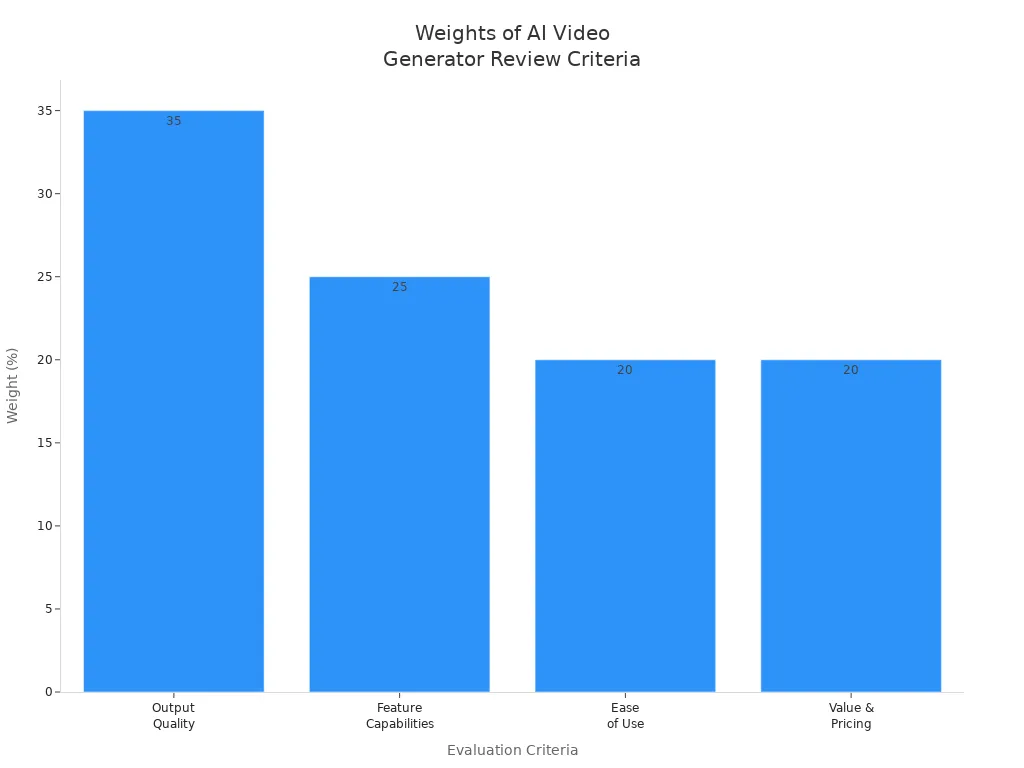
Kling 2.6 on karavideo.ai did very well in output quality and features. You get a tool that is easy to use and gives good value. If you want pro results and simple steps, Kling 2.6 is a great pick.
Kling 2.6 Key Features
If you want to know why Kling 2.6 is special, here are its top features. These features help you make better videos.
Native Audio and 1080p Output
Kling 2.6 makes audio and video at the same time. You do not need to record sound by itself. You just type what you want, and Kling 2.6 does the rest. This saves you lots of time and keeps things easy.
- Kling 2.6 makes both sound and video from one prompt.
- You get voices, background sounds, and lip-sync that looks real.
- The sound matches the pictures, so characters seem natural.
- You do not get stuck waiting. What used to take half an hour now takes only one step.
You also get clear 1080p video. Your videos look sharp and nice. This works well for social media, school, and work. Kling 2.6 keeps sound and video lined up, so your projects look great.
Tip: If you want your videos to sound real, try different voices in your prompts. Kling ai lets you use many styles, so you can test them.
Motion and Aspect Ratio Controls
Kling 2.6 lets you control how things move. You can show full-body actions and keep animations looking real. You can move hands and make gestures for close-up shots. You can change the way your video looks to match your picture or video. This helps you make videos for different places and styles.
You can also pick the shape of your video. Kling 2.6 helps you set the right size for your project. If you want tall videos for phones or wide ones for computers, you can choose. Kling video models help keep your characters the same. You do not have to worry about sudden changes. Your videos stay smooth and look real.
Advanced Text-to-Video and Image-to-Video
Kling 2.6 is much better at making videos with ai. You can use words or pictures to start, and Kling 2.6 makes videos with sound and motion that match. The new version gives you more choices and better results.
Here is a table that shows what is new:
You get more choices with Kling 2.6. You can set how long your video is, pick the shape, and choose the voice language. Kling ai lets you make videos for any group, in English, Chinese, or other languages. Karavideo.ai keeps Kling 2.6 up to date, so you always get new features.
If you want to try more controls, start simple and add details later. Karavideo.ai makes it easy to learn and test new things.
Note: Kling 2.6 on karavideo.ai is made for people who want fast, good, and easy videos. You do not need to be a tech expert to get great results.
Pricing and Plans
Subscription Tiers
When you look at Kling 2.6 on the karavideo.ai platform, you see a range of plans. You can start for free or pick a paid plan that fits your needs. Here’s a quick table to help you compare:
The free plan gives you a taste of what Kling 2.6 can do. If you want more credits or higher video quality, you can move up to kling 2.6 standard, pro, premier, or ultra. Each step gives you more monthly credits and better features.
Value for Money
You might wonder if these plans are worth it. When you compare kling 2.6 pro to other ai video tools, you get a good deal. For example, kling 2.6 pro costs about $12.88 per month for 3,000 credits. Sora, a popular competitor, charges $20 per month and does not offer as many credits.
Kling ai keeps prices fair for what you get. You save even more if you pay yearly. The standard plan is great for hobbyists, while pro and premier work well for regular creators and teams. Ultra is best for agencies that need lots of videos.
If you want to try before you buy, the free plan on karavideo.ai lets you explore without risk. You can upgrade anytime as your needs grow. This makes kling a flexible choice for anyone who wants to create videos with ai.
AI Model and Performance
Speed and Reliability
When you use Kling 2.6 on karavideo.ai, you see it works fast. The tool makes audio and video at the same time. You do not need to wait for each part. This saves time and helps you work better. The AI model in Kling 2.6 puts sound and pictures together in one go. You always get results that match up.
Kling 2.6 is better than many other tools. It can show hard moves, like sports, better than most. Sometimes, it might miss small things or have tiny mistakes. But most of the time, it works well. The system keeps motion and depth steady, so videos look real. You can count on Kling 2.6 to be quick and steady for most jobs.
Here’s a table to show how Kling 2.6 is different from older versions:
Output Quality
You want your videos to look real and sound good. Kling 2.6 gives you sharp and clear video. This is important for pro work. The tool can make 1080p video and even turn it into 4K. You can pick the shape of your video, so it fits anywhere.
Kling 2.6 gets high scores for how videos look. It makes people and places look real. The sound is clear, with voices and effects at 48kHz. Everything matches up, so your videos look finished. Many people use Kling 2.6 for stories, ads, and more. The AI lets you focus on your ideas, not the hard parts.
Tip: For the best videos, use clear and detailed prompts. Kling 2.6 works best when you give it good instructions.
Privacy and Security in AI Video Creation
Data Handling
When you use Kling 2.6 on karavideo.ai, your privacy is important. Karavideo.ai only collects what they need to make the service work. You give them prompts, video content, account info, and payment details. They use this information to help you make videos and manage your account. It also helps them make the service better. All your data is kept safe on encrypted servers. This means your information is protected. Karavideo.ai does not sell your data to anyone. Sometimes, they share your info with trusted helpers, but only to keep things working well.
Here’s a quick look at how karavideo.ai handles your data:
Karavideo.ai follows strong privacy rules. You get to choose what you want to share. If you want your data deleted or moved, you can ask for it.
User Control
You are always in charge when you use Kling 2.6 on karavideo.ai. You pick what information you share and how it is used. Karavideo.ai lets you say yes or no to model training and marketing. You can see your data, change it, or ask to delete it anytime. This helps you feel safe.
Karavideo.ai follows big privacy laws like GDPR and CCPA. You are protected if you live in the US, Europe, or somewhere else. Some features might be different based on where you live, but your privacy is always important to karavideo.ai.
Note: If you want more control, check your karavideo.ai account settings. You can change your privacy choices whenever you want.
Kling 2.6 uses artificial intelligence to help you make videos, but you always control your personal data. Karavideo.ai keeps your information safe and gives you tools to manage it.
Kling Platform and App Availability
Supported Devices
You can use Kling 2.6 on lots of devices. This makes it simple to add to your work. If you have a Windows PC or a Mac, you can use Kling 2.6 in your browser. You do not need to install anything special. Tablets and smartphones work too, so you can make videos anywhere. Karavideo.ai keeps the platform fresh with updates. You always get new features, no matter your device. Most people say Kling 2.6 works well on new devices with good internet.
Here’s a quick list of supported devices:
- Windows computers
- Mac computers
- Tablets (iOS and Android)
- Smartphones (iOS and Android)
- Any device with a modern web browser
Tip: For the best results, use a big screen and fast internet. This helps you see your videos better and work faster.
Accessibility
Kling 2.6 on karavideo.ai is open to people all over the world. You can log in and make videos from almost any country. The platform uses both English and Chinese, so more people can use it. Some features might not work everywhere. Local rules and safety checks decide what you can do with Kling 2.6. The platform uses filters to block some topics, especially if they are not allowed in your area.
Here’s a table that shows some of these limits:
If you live where there are strict rules, some prompts may not work. Karavideo.ai changes these filters often to match new laws and keep you safe. You always get a safe and fair experience, but you might see some limits based on where you live.
Kling 2.6 vs. Other AI Video Generators
Main Competitors
You may wonder how Kling 2.6 compares to other top AI video tools. On karavideo.ai, Kling 2.6 has some strong rivals. The main ones are Alibaba Wan 2.6, Hailuo 2.3, Sora 2, and Overchat AI. Each one has something special.
Here’s a quick look at what these tools do best:
If you want the best AI video tool, you should know what each one does well.
Strengths and Weaknesses
Kling 2.6, made by kling ai and found on karavideo.ai, stands out for a few reasons. It gives you great motion control, so characters move smoothly. Hands and faces look clear, not blurry. You can make videos up to three minutes long. That is longer than most other tools. Kling 2.6 also gives you cool camera effects, like point-of-view and handheld shots. This makes your videos feel more real.
Let’s see how some features compare:
There are a few things to watch out for. Kling 2.6 pro uses more credits for longer videos. Some advanced features may not work everywhere because of local rules. If you want movie-level quality, Hailuo 2.3 might be better. Alibaba Wan 2.6 is good if you want to use your own face and voice.
Tip: Try out different tools on karavideo.ai to find the one that fits your needs and style.
Kling 2.6 gives you lots of control and longer videos, but you should pick what matters most for your work.
Pros and Cons of Kling 2.6
Advantages
There are many good things about using kling 2.6 on karavideo.ai. The tool helps you work faster and makes things simple. You can make videos where people move in a real way. Characters look the same in every part of your video. This keeps your story smooth and easy to follow. The editing tools let you fix mistakes fast. You do not have to spend a long time learning how to use it.
Here’s a table that shows what creators like:
You also get videos that look like movies. The voices sound natural and show feelings. Background sounds and effects match the action. This makes your videos feel exciting and real. If you want to make great videos, kling ai gives you what you need.
Tip: Try different prompts on karavideo.ai. See how changing words can make motion and sound different in your videos.
Limitations
Kling 2.6 pro has lots of features, but there are some problems. The longest video you can make is only 10 seconds. If you want longer videos, you have to use other editing tools. The sound is not always good enough for pro work. Sometimes, background sounds and lip-sync do not work well in hard scenes. If you use the free plan, you might wait days for your video to finish.
Here’s a table with common problems users see:
You might also see problems with hard dance moves or showing words in your video. If you want to make very advanced videos, kling ai might not do everything you want. Karavideo.ai adds new updates a lot, but some problems are still there.
Note: Always think about what your project needs before you start on karavideo.ai. If you need longer or harder videos, you may need to do more editing.
Use Cases and Ideal Users
Practical Applications
You might ask where kling 2.6 works best. This tool on karavideo.ai helps you make videos for many things. If you work in e-commerce, you can show products or explain how they work. Content creators use kling 2.6 for vlogs, news, and documentaries. You can also make fun videos, like interviews or music clips. Sports fans use it for talking about games. Creative people enjoy making ASMR or cool ads.
Here’s a table that shows some popular ways people use kling 2.6:
Tip: Try kling ai for short explainers or creative ads. You can get good results fast, even if you are new to ai video tools.
Who Benefits Most
Kling 2.6 is great if you want to turn ideas into videos fast. Businesses like how it makes marketing videos and explainers simple. Marketers use it to get attention with new content. Teachers find it helpful for lessons and tutorials. If you are a content creator, you can make many videos without spending hours editing.
Here’s a quick list of who gets the most from kling 2.6 on karavideo.ai:
- Marketers who need fun marketing videos.
- Teachers who want to make lessons easy and interesting.
- Content creators who need to make lots of videos quickly.
If you are a filmmaker, you will like the pro api made for filmmakers. This gives you more control and helps you make advanced projects. Kling 2.6 is special because it saves time and keeps your work looking good. With kling ai, you can focus on your story and let the tool do the hard work.
Note: You do not have to be a tech expert to use kling 2.6. The platform makes video creation simple for everyone.
Technological Singularity and the Future of AI Video
Kling’s Role in AI Evolution
You might ask how Kling 2.6 is changing ai video. Today, making videos is different than before. Kling on karavideo.ai puts sound, movement, and pictures together at once. This makes videos look real and saves you time. You do not need to use many apps or fix things by yourself.
Here’s a table that shows how Kling helps ai video get better:
These features help everyone make real ai movies. Kling 2.6 lets you make videos that look and sound like a pro made them. This is a big step toward smarter ai. The tools learn and get better, like a smart helper.
What’s Next for AI Video Tools
The future of ai video is full of new ideas. More tools will use smart technology to help you tell stories. Some people talk about the technological singularity. This is when machines become smarter than people. You might hear words like intelligence explosion or superintelligences design. These mean ai could get much smarter very quickly.
One day, you might use your mind to make videos with brain-computer interfaces. The difference between people and machines will get smaller. You will have more ways to create and share your ideas. Kling and karavideo.ai are leading this change. You can join in as ai video tools keep getting better.
Imagine a world where you think of a story, and your video shows up. That is what the singularity could bring.
You get a lot from kling 2.6 on karavideo.ai. The tool makes short videos with real movement and synced audio. You can use it for social media, marketing, e-commerce, or teaching. Some users find it less ideal for long videos or non-English/Chinese audio. If you want to try other ai video tools, check out Veo 3.1 or FinalFrame.
You can start with kling 2.6 for quick, creative projects. The future of video creation looks exciting as these tools keep improving.
FAQ
How do you start using Kling 2.6 on karavideo.ai?
You sign up on karavideo.ai. Pick a plan that fits your needs. Try the free version first. You can upgrade anytime. The platform guides you through each step.
Can you make videos longer than 10 seconds with Kling 2.6?
Kling 2.6 on karavideo.ai limits each video to 10 seconds. If you want longer content, you need to combine clips or use other editing tools after downloading.
What languages does Kling 2.6 support?
You can create videos in English and Chinese on karavideo.ai. The platform may add more languages soon. Always check for updates to see new options.
Is your data safe when you use Kling 2.6?
Karavideo.ai keeps your data secure with encrypted servers. You control what you share. You can request to delete or move your information anytime.
Who should use Kling 2.6 on karavideo.ai?
You benefit most if you want fast, creative videos. Marketers, teachers, and content creators use Kling 2.6 for short explainers, ads, and lessons. The platform makes video creation easy for everyone.