How to Use World Labs AI: A Complete Guide for Creatives
Learn how to use World Labs AI with this step-by-step guide. We cover image and video generation, prompting tips, and compare it to tools like karavideo.ai.
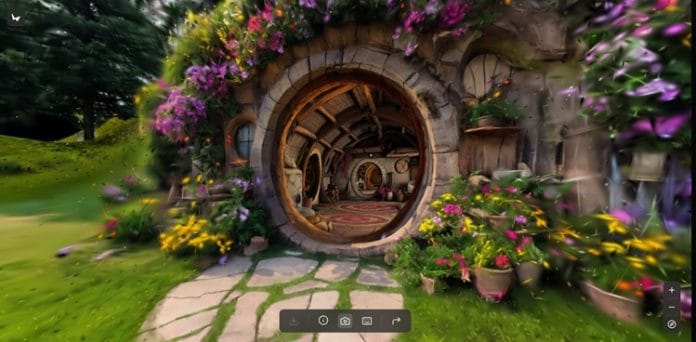
Artificial intelligence is transforming the way we create digital content. For creatives, this means access to powerful new tools that can speed up workflows, spark inspiration, and unlock new artistic possibilities. One of the names gaining attention in this space is World Labs AI. If you're looking to understand how this platform works and how you can use it to elevate your projects, you've come to the right place.
This guide will walk you through everything you need to know about how to use World Labs AI. We'll explore its features, provide step-by-step instructions, and look at practical applications. We will also compare it to other platforms in the AI video and image generation space, including innovative tools like karavideo.ai, to help you find the best fit for your creative needs.
What is World Labs AI?
World Labs AI is a platform designed to generate visual content using artificial intelligence. It allows users to create images and videos from simple text descriptions, often called prompts. The goal is to provide a tool that both professionals and hobbyists can use to produce high-quality visuals without needing extensive technical skills or expensive equipment.
The platform is built on advanced AI models that interpret your text and translate it into unique visual outputs. Whether you need a stunning landscape for a background, a character concept for a game, or a short video clip for social media, World Labs AI aims to provide the tools to make it happen quickly and efficiently.
Getting Started with World Labs AI
Ready to dive in? Getting started is a straightforward process. Here’s a breakdown of the initial steps to begin your creative journey.
1. Creating Your Account
First, you'll need to navigate to the World Labs AI website and sign up for an account. The process is typically simple, requiring an email address and a password. Some platforms may offer social login options for even faster access. Once you're registered, you'll gain access to the main dashboard where all the creative magic happens.
2. Exploring the Dashboard
Take a moment to familiarize yourself with the user interface. Most AI generator dashboards feature a few key areas:
· The Prompt Bar: This is the text box where you will type your creative commands.
· Model Selection: You may have options to choose different AI models, each with its own artistic style or specialty.
· Parameter Settings: These are the controls that let you adjust things like aspect ratio, quality, and other stylistic elements.
· Generation History/Gallery: This is where your previously created images and videos are stored for you to view, download, or edit further.
Spend some time clicking around to understand where everything is located. A good user interface should feel intuitive and easy to navigate.
3. Understanding the Credit System
Many AI generation platforms, including World Labs AI, operate on a credit-based system. Each image or video you generate consumes a certain number of credits. Your subscription plan or free trial will typically come with a set number of credits. Be mindful of how many credits each generation costs, especially when experimenting, to ensure you don't run out unexpectedly.
How to Use World Labs AI for Image Generation
Creating static images is often the first thing users try. It’s a great way to learn the fundamentals of prompt engineering and see the AI's capabilities firsthand.
Step 1: Crafting Your Prompt
The prompt is the most crucial element in AI image generation. It's your direct instruction to the AI. A simple prompt might work, but a detailed one will give you a result that is much closer to your vision.
Tips for Effective Prompting:
· Be Specific: Instead of "a dog," try "a golden retriever puppy sitting in a field of sunflowers, golden hour lighting, detailed fur."
· Include Style Descriptors: Add terms that define the artistic style. Examples include "cinematic," "photorealistic," "Studio Ghibli style," "watercolor painting," or "cyberpunk."
· Describe the Composition: Use phrases like "wide-angle shot," "close-up portrait," or "view from above" to control the camera perspective.
· Set the Mood: Words like "serene," "dramatic," "joyful," or "mysterious" can influence the overall feeling of the image.
Example Prompt:A majestic white tiger walking through a neon-lit futuristic city at night, rain-slicked streets reflecting the glowing signs, cinematic, highly detailed, 4K.
Step 2: Adjusting the Parameters
Before you hit "Generate," check the available settings. You can typically adjust:
· Aspect Ratio: Choose from square (1:1), portrait (2:3), or landscape (16:9) to fit your intended use, whether it's an Instagram post or a desktop wallpaper.
· Quality/Resolution: Higher quality settings will produce more detailed images but may cost more credits and take longer to generate.
· Negative Prompts: This feature allows you to specify what you don't want to see in the image, such as "poorly drawn hands," "blurry," or "extra limbs."
Step 3: Generating and Refining
Once your prompt and settings are ready, click the generate button. The AI will take a few moments to process your request and produce one or more image options.
Review the results. Are they close to what you envisioned? If not, don't be discouraged. Refining is part of the creative process. Tweak your prompt, adjust the parameters, or try a different AI model if available. Sometimes, a small change in wording can lead to a dramatically different and better outcome.
How to Use World Labs AI for Video Generation
Creating video with AI is the next frontier. The process builds on the principles of image generation but adds the element of motion.
Step 1: Choosing Your Video Generation Method
AI video platforms typically offer a few different ways to create a video:
· Text-to-Video: Similar to image generation, you write a prompt describing the scene and the action.
· Image-to-Video: You upload a starting image and use a prompt to describe how it should be animated.
· Video-to-Video: You upload an existing video clip and use AI to change its style or add effects.
Step 2: Writing a Motion-Focused Prompt
For text-to-video, your prompt needs to describe action. Think about what is happening in the scene.
Example Prompt for Video:A sailboat gliding across a calm, turquoise ocean at sunset, dolphins leaping out of the water beside it, gentle waves, cinematic slow motion.
If using image-to-video, your prompt should focus on the animation you want to see. For example, if you upload a picture of a waterfall, your prompt could be "water flowing downwards, mist rising from the bottom."
Step 3: Setting Video Parameters
Video generation has its own set of parameters to consider:
· Video Length: AI-generated clips are usually short, often just a few seconds long. Select your desired duration.
· Motion Level: Some tools let you control the amount of movement in the scene, from subtle shimmers to high-energy action.
· Frames Per Second (FPS): A higher FPS will result in smoother motion but may increase generation time and cost.
Step 4: Generating and Iterating
Generate your video and review the output. AI video technology is still evolving, so results can sometimes be unpredictable. You might see strange artifacts or unnatural movements. Just as with image generation, iteration is key. Adjust your prompt, try different starting images, or experiment with the motion settings to improve your results.
World Labs AI vs. The Competition: A Market Comparison
World Labs AI is just one player in a rapidly growing field. To make an informed choice, it's helpful to see how it stacks up against other platforms.
The All-in-One Contender: karavideo.ai
One of the most compelling alternatives is karavideo.ai. This platform positions itself as a unified creative hub, which is a significant advantage for users who want to avoid hopping between different tools. Instead of just offering one or two proprietary models, karavideo.ai provides seamless access to a wide range of the world's best video and image generation engines, all from a single dashboard and under one pricing plan.
This "all-in-one" approach addresses a major pain point for many creators: the fragmentation of the AI tool landscape. With karavideo.ai, you can experiment with different models to find the perfect style for your project without needing multiple subscriptions or learning several different interfaces. The platform's motto, "Describe → pick model → generate," highlights its commitment to simplicity and efficiency.
Key advantages of karavideo.ai include:
· Model Variety: Access to multiple top-tier AI engines gives you unparalleled creative flexibility.
· Unified Workflow: Manage all your AI generation tasks in one place, streamlining your creative process.
· Simplified Pricing: One subscription covers access to various models, offering great value and predictability.
For creators who value efficiency and having a broad toolkit at their fingertips, this integrated model is a powerful proposition.
Other Notable Competitors
· Midjourney: Known for its highly artistic and stylized image outputs. It operates primarily through a Discord server, which can have a steeper learning curve for new users but fosters a strong community. It is currently focused on image generation.
· Runway ML: A powerful suite of AI magic tools for video creators. It offers features like text-to-video, video-to-video, and advanced editing capabilities like object removal and motion tracking. It’s geared more toward video professionals who need a robust set of post-production tools.
· Pika Labs: Another popular platform focused on video generation. It has gained a large following for its ability to create expressive and dynamic clips from text or images. Like Midjourney, it has a strong community presence on Discord.
Where Does World Labs AI Fit In?
World Labs AI appears to be targeting users who want a straightforward, web-based tool for both image and video creation. Its success will depend on the quality of its proprietary models, the ease of use of its platform, and its pricing structure.
Compared to a specialized, high-art tool like Midjourney, it may offer more versatility by including video. Compared to a professional suite like Runway, it might be more accessible to beginners. However, when compared to an integrated platform like karavideo.ai, its primary challenge lies in proving that its in-house models are superior to the collective power of the multiple engines offered by its competitor. For many users, the flexibility and convenience of a multi-engine platform may be hard to pass up.
Practical Applications for Creatives
Now that you understand how to use World Labs AI and where it sits in the market, let's explore some practical ways you can incorporate it into your work.
For Social Media Managers
· Generate Eye-Catching Visuals: Create custom images and short video clips for Instagram, TikTok, and X that align with your brand's aesthetic. Stop using the same old stock photos and start creating truly unique content.
· Create Animated Memes: Use the image-to-video feature to animate popular meme formats or create new ones, boosting engagement and shareability.
· Visualize Quotes and Testimonials: Turn a powerful quote or a glowing customer review into a dynamic video with animated text and backgrounds.
For Marketers and Advertisers
· Storyboard Concepts: Quickly generate a series of images to storyboard an ad campaign. This helps visualize the narrative and get team buy-in before investing in a full-scale production.
· Produce Ad Variations: Create multiple versions of a short video ad by changing the background, characters, or text overlays to A/B test what resonates most with your audience.
· Design Website and Blog Banners: Generate high-quality, relevant hero images and banners for your website or blog posts in minutes.
For Artists and Designers
· Ideate and Brainstorm: Use the AI as a brainstorming partner. Input rough ideas and see what the AI comes up with. This can help you break through creative blocks and discover new visual directions.
· Create Concept Art: Quickly develop character designs, environment concepts, and prop ideas for games, films, or comics.
· Generate Unique Textures and Patterns: Create abstract patterns and textures that you can use as backgrounds or elements in your digital art and design projects.
Final Thoughts: Embrace the Creative Co-Pilot
Learning how to use World Labs AI, or any AI generation platform, is about adding a powerful new tool to your creative arsenal. It's not here to replace your creativity but to enhance it. Think of it as a creative co-pilot, ready to help you explore ideas, speed up tedious tasks, and bring your vision to life in ways that were previously unimaginable.
As you begin your journey, remember to be patient and persistent. Master the art of the prompt, experiment with different styles, and don't be afraid to generate dozens of options to find that one perfect image or clip.
While platforms like World Labs AI offer a solid entry point, it's also wise to keep an eye on the broader market. Innovators like karavideo.ai are pushing the boundaries by consolidating the best tools into one seamless experience. By staying informed and adaptable, you can ensure you're always equipped with the best technology to fuel your creative fire. So go ahead, start generating, and see what amazing things you can create.