How to Use Flux Dev Ultra: A Complete Guide
Learn how to use Flux Dev Ultra with our step-by-step guide. Discover pro tips, common uses, and how to craft the perfect prompt for stunning AI videos.
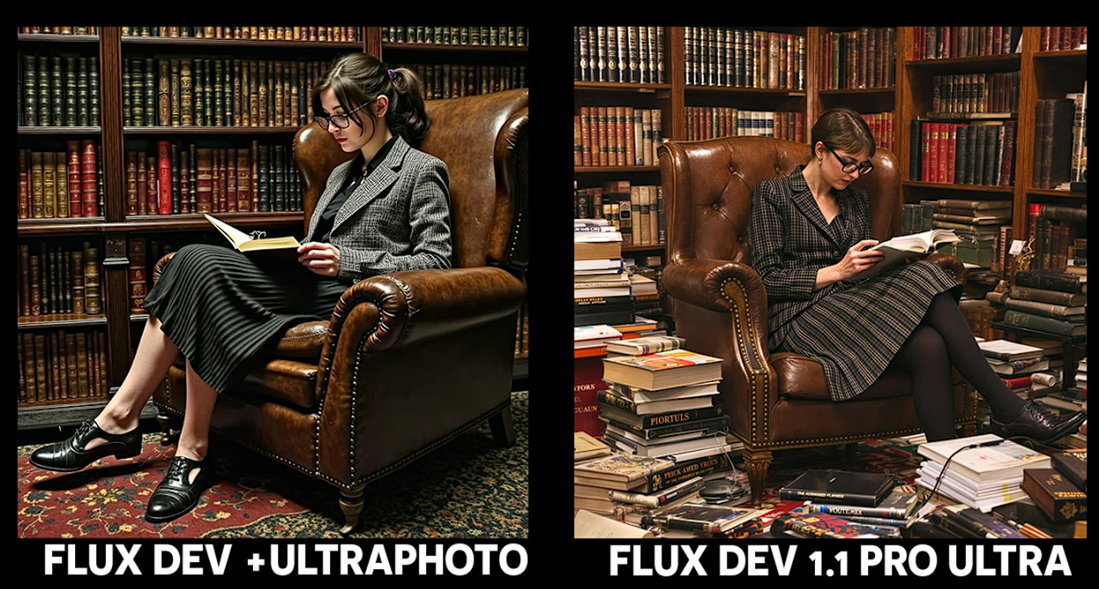
Unleash your creative power and transform your ideas into stunning visuals with Flux Dev Ultra. This guide will walk you through everything you need to know about this innovative tool, from its core features to practical, step-by-step instructions. Get ready to supercharge your video creation process and discover how to use Flux Dev Ultra to produce incredible content effortlessly.
Flux Dev Ultra is a state-of-the-art model designed to push the boundaries of AI video generation. It's integrated into platforms like karavideo.ai, offering users a seamless way to create high-quality, dynamic video clips from simple text prompts. Whether you're a seasoned creator or just starting, understanding this tool is your first step toward unlocking a new level of creative expression.
In this comprehensive post, we'll explore:
- An introduction to Flux Dev Ultra and its capabilities.
- Key features that make it a standout choice.
- A step-by-step guide to using the model effectively.
- Practical tips and common use cases to inspire your next project.
- A comparison with other tools to see where it shines.
- How to overcome potential challenges and get the best results.
What is Flux Dev Ultra?
Flux Dev Ultra is an advanced generative AI model specialized in creating short, high-fidelity video clips from text descriptions. Think of it as a powerful engine that takes your written ideas and translates them into motion. It excels at producing intricate details, dynamic camera movements, and photorealistic textures, making it a go-to choice for creators who demand quality and precision.
Unlike many other video generation tools that can sometimes produce vague or distorted results, Flux Dev Ultra is engineered for clarity and coherence. It understands complex prompts that include specific actions, subjects, and environments, delivering outputs that closely match your vision.
On a platform like karavideo.ai, Flux Dev Ultra is part of a larger ecosystem of creative tools. This integration means you don't need to be a technical expert to harness its power. The user-friendly interface allows you to simply type a description, select the model, and generate your video. This ease of use democratizes high-end video production, making it accessible to everyone.
Key Features of Flux Dev Ultra
What makes Flux Dev Ultra so special? It's a combination of powerful features designed to give you maximum creative control and exceptional results. Let's explore what sets it apart.
High-Fidelity Video Generation
The primary strength of Flux Dev Ultra is its ability to generate videos with stunning detail and realism. It can render complex textures like fur, water, and metallic surfaces with incredible accuracy. This makes it ideal for creating content that needs a professional, polished look, from product showcases to cinematic scenes.
Superior Prompt Adherence
One of the biggest challenges in AI generation is getting the model to accurately interpret your instructions. Flux Dev Ultra shows remarkable prompt adherence. You can provide detailed descriptions involving multiple subjects, specific actions, and complex camera movements, and the model will follow them with surprising precision. This reduces the need for trial and error, saving you valuable time.
Dynamic Camera Control
Static shots can be boring. Flux Dev Ultra allows you to specify camera movements directly in your prompt. Want a slow pan across a landscape, a dramatic zoom-in on a character's face, or a fast-paced tracking shot? Just describe it. This feature adds a layer of cinematic quality to your creations that many other tools lack.
Versatile Styles and Aesthetics
While it excels at photorealism, Flux Dev Ultra is not limited to it. You can guide the model to produce videos in various styles, including anime, fantasy art, 3D rendering, and more. By adding stylistic keywords to your prompt, you can easily shift the aesthetic to match your project's needs, making it an incredibly versatile tool for any creator.
Seamless Integration on Platforms like karavideo.ai
Using a powerful model like this doesn't have to be complicated. Platforms like karavideo.ai offer a streamlined experience. You get access to Flux Dev Ultra and other top-tier models all within one dashboard, with a single subscription. There's no complex setup, no hopping between different tools, and no need to manage multiple accounts. It's all about making your creative process as smooth as possible.
- Describe: Write out your idea.
- Pick Model: Choose Flux Dev Ultra.
- Generate: Click and watch your video come to life.
This "describe, pick, generate" workflow is designed for efficiency and empowers you to focus on creativity, not technical hurdles.
How to Use Flux Dev Ultra: A Step-by-Step Guide
Ready to start creating? Using Flux Dev Ultra is surprisingly straightforward, especially on an integrated platform. Here’s a detailed walkthrough to guide you from idea to finished video.
Step 1: Sign Up and Access the Platform
First, you'll need an account on a platform that offers Flux Dev Ultra, such as karavideo.ai. The signup process is typically quick and easy. Once you're in, navigate to the video generation section. You'll find a workspace where you can input prompts and select different AI models.
Step 2: Crafting the Perfect Prompt
The prompt is the most crucial element in guiding the AI. A well-written prompt can be the difference between a generic clip and a masterpiece. Here’s how to structure your prompts for success with Flux Dev Ultra.
Be Specific and Detailed:
Don't be vague. Instead of "a car driving," try "a vintage red convertible driving along a coastal highway at sunset, ocean waves crashing on the shore." The more detail you provide, the better the model can understand and execute your vision.
- Subject: What is the main focus? (e.g., "a majestic lion," "a futuristic robot")
- Action: What is the subject doing? (e.g., "walking through a dense jungle," "assembling a complex device")
- Environment: Where is the scene taking place? (e.g., "in a neon-lit cyberpunk city," "on a serene mountain peak")
- Lighting and Mood: What is the atmosphere? (e.g., "soft morning light," "dramatic, shadowy lighting," "a joyful, vibrant mood")
Incorporate Camera Movements:
To make your video more dynamic, add camera instructions. Use phrases like:
- "Slow pan from left to right..."
- "Dramatic zoom-in on the character's eyes..."
- "Aerial drone shot flying over..."
- "First-person point of view running through..."
Define the Style:
If you want a specific aesthetic, add it to your prompt. Examples include:
- "in the style of anime"
- "cinematic, photorealistic"
- "3D render, octane render"
- "watercolor painting style"
- "pixel art"
Example Prompt:
"Cinematic shot of a lone astronaut planting a flag on Mars. The red planet's desolate landscape stretches to the horizon under a dusty pink sky. Earth is a small, bright dot in the distance. Slow zoom-out to reveal the vastness of space. Photorealistic, 4K."
Step 3: Select the Flux Dev Ultra Model
In the generation interface, you'll see a list of available AI models. Each has its strengths. For the highest quality and best prompt adherence, select Flux Dev Ultra from the menu. Some platforms may also have settings for aspect ratio (e.g., 16:9 for widescreen, 9:16 for vertical video) or video duration. Adjust these to fit your needs.
Step 4: Generate and Review Your Video
Once your prompt is ready and the model is selected, hit the "Generate" button. The platform will process your request, which may take a few moments depending on the complexity and server load.
After generation, a preview of your video clip will appear. Review it carefully. Does it match your prompt? Is the quality what you expected? It's rare to get the perfect result on the very first try. AI generation is an iterative process.
Step 5: Iterate and Refine
If the video isn't quite right, don't worry. This is a normal part of the creative workflow. Go back to your prompt and make adjustments.
- Is something missing? Add more detail to your description.
- Is the style wrong? Be more explicit with your style keywords.
- Is the movement awkward? Try rephrasing your camera instructions.
Sometimes, small changes can lead to big improvements. For example, changing "a cat" to "a fluffy Siamese cat" can significantly alter the output. Keep experimenting with different wording and details until you're happy with the result.
Step 6: Download and Use Your Creation
Once you have a video you love, you can download it in high resolution. From there, you can use it in your projects—whether it's for a social media post, a marketing campaign, a short film, or a personal art project. Many platforms also allow you to string multiple clips together or add effects, further enhancing your final product.
Practical Tips for Getting the Best Results
Mastering how to use Flux Dev Ultra involves more than just following steps. It’s an art. Here are some pro tips to elevate your creations.
1. Use Strong, Evocative Language
Use powerful verbs and descriptive adjectives. Instead of "a man walks," try "a man strolls," "a man trudges," or "a man sprints." Each word paints a different picture and influences the AI's output.
2. The Power of Negative Prompts
Some advanced interfaces allow for "negative prompts." This is where you tell the AI what you don't want to see. For example, if your generations keep coming out blurry or with extra limbs, you could add negative prompts like "blurry, deformed, extra fingers, poor quality." This helps clean up your results and steer the AI away from common flaws.
3. Experiment with "Seed" Numbers
A "seed" number is a starting point for the generation process. If you use the same prompt and the same seed number, you will get the exact same result every time. If you like a particular output but want to make a small tweak, keeping the same seed number can help you maintain consistency while you adjust the prompt. Conversely, changing the seed number with the same prompt will give you a completely new variation.
4. Combine It with Other Tools
Flux Dev Ultra is fantastic for creating short clips, but you might need other tools for a full video project. Use a video editor to stitch multiple AI-generated clips together, add sound effects, music, and text overlays. The combination of AI generation and traditional editing is where the real magic happens.
5. Study Prompts from Other Creators
Many AI art and video communities share their creations along with the prompts used to make them. Study these examples to learn new techniques and descriptive phrases. You'll quickly pick up on keywords and structures that consistently produce great results.
Common Use Cases for Flux Dev Ultra
The possibilities are virtually endless, but here are some popular and effective ways people are using Flux Dev Ultra.
- Marketing and Advertising: Create eye-catching product videos, social media ads, and promotional content without the cost of a full film crew. Imagine generating a stunning clip of your product in any setting imaginable.
- Content Creation for Social Media: Generate unique video backgrounds, animated characters, or viral-ready clips for TikTok, Instagram Reels, and YouTube Shorts.
- Concept Art and Storyboarding: Quickly visualize scenes for films, games, or animations. Flux Dev Ultra can act as a rapid prototyping tool to bring storyboards to life.
- Music Videos: Create abstract visuals or narrative scenes that sync with music, offering independent artists a way to produce high-quality music videos on a budget.
- Educational Content: Generate animations to explain complex topics or historical events, making learning more engaging.
- Personal Art Projects: Let your imagination run wild. Create fantasy landscapes, sci-fi cityscapes, or surreal dream sequences for your own artistic exploration.
Flux Dev Ultra vs. Other Platforms
The AI video space is becoming crowded, with tools like Runway, Pika, and Sora making headlines. So, where does Flux Dev Ultra, especially when accessed through a platform like karavideo.ai, fit in?
- Runway: Runway is a powerful and versatile platform with a wide range of tools beyond video generation. However, some users may find its interface more complex. The advantage of using Flux Dev Ultra on a platform like karavideo.ai is the streamlined, user-friendly experience focused purely on generation. You get the power without the steep learning curve.
- Pika: Pika has gained popularity for its accessibility and features like modifying existing videos. It's a great tool, but Flux Dev Ultra often excels in terms of photorealism and adherence to complex prompts. For creators who need high-fidelity output that closely matches a detailed vision, Flux Dev Ultra is often the superior choice.
- Sora: OpenAI's Sora has demonstrated incredible capabilities in generating longer, more coherent videos. However, it is not yet widely available to the public. Flux Dev Ultra is a tool you can access and use today on platforms like karavideo.ai. It provides an immediate, practical solution for high-quality video generation.
The key advantage of a unified platform like karavideo.ai is convenience and value. Instead of subscribing to multiple services to access different models, you get seamless access to the world’s best video engines—all from one dashboard with one price. This model-agnostic approach lets you choose the best tool for the job without any friction.
Potential Challenges and How to Overcome Them
While Flux Dev Ultra is incredibly powerful, you may encounter some challenges. Here’s how to troubleshoot them.
Challenge: Inconsistent Results
Sometimes, the same prompt can produce wildly different results. This is the nature of generative AI.
- Solution: Use the "seed" number feature if available. By locking the seed, you can make small, iterative changes to your prompt while maintaining a consistent base, giving you more control over the outcome.
Challenge: Unwanted Artifacts or Deformities
AI can sometimes struggle with certain details, like hands or text, leading to strange-looking outputs.
- Solution: Use negative prompts to specify what to avoid (e.g., "deformed hands, garbled text"). You can also try re-running the generation, as a different attempt might not have the same issue. If the problem persists, try simplifying the part of the prompt that seems to be causing the issue.
Challenge: Interpreting Your Prompt Too Literally (or Not Literally Enough)
The AI might focus on an unintended part of your prompt or miss the main idea entirely.
- Solution: Refine your prompt structure. Put the most important elements at the beginning. Use weighting syntax if the platform supports it (e.g.,
(word:1.5)) to increase the emphasis on certain concepts. Simplifying your language can also help the model better grasp the core subject.
Conclusion: Why Flux Dev Ultra is a Game-Changer
Flux Dev Ultra represents a significant leap forward in AI video generation. Its ability to create high-fidelity, dynamic, and stylistically versatile videos from simple text prompts empowers creators in unprecedented ways. When integrated into a user-friendly platform, it tears down the technical and financial barriers that once stood in the way of professional-quality video production.
By mastering how to use Flux Dev Ultra, you are not just learning to use another tool; you are unlocking a new medium for your imagination. The iterative process of prompt crafting, generation, and refinement is a creative journey in itself, one that rewards experimentation and attention to detail.
Whether you're a marketer looking for an edge, an artist exploring new frontiers, or a content creator seeking efficiency, Flux Dev Ultra offers a powerful and accessible solution. It stands out in a crowded market by delivering on its promise of quality, control, and creative freedom.