Flux Dev Ultra Review: Is It Worth Your Time?
You want results, not reasons why something failed. Flux dev ultra gives fast speed, clear images, and is easy to use
You want results, not reasons why something failed. Flux dev ultra gives fast speed, clear images, and is easy to use. Most people feel happy with what they get. 96% say they like the Flux AI image generator. If you want quick and cool images without hard steps, flux dev ultra is the best pick for you.
Key Takeaways
- Flux Dev Ultra makes great images very fast. This is good for people who want quick results.
- The platform is easy to use. Anyone can make images without needing to learn a lot first.
- You can change the image size and use editing tools. This helps you make images for different projects and styles.
- There is a free trial. You can try the tool before you pay. This helps you see if it works for you.
- It usually works well, but some people have problems on Windows. Using the right setup can stop these problems.
What Is Flux Dev Ultra
Overview and Brand Evolution
You need a tool that works well for you. Flux dev ultra is a strong AI image generator on the karavideo.ai platform. The brand has changed a lot since it started. You can see how it grew in the table below:
Every new version gives you better results and more control. The people who make flux dev listen to users and keep making it better. You get a tool that grows with what you want to do.
Key Features
Flux dev ultra has features that make image creation fast and easy. You do not have to deal with hard steps. Here are some main points:
- Lightning-fast image creation: You get images in seconds.
- High-quality outputs: The images look sharp and clear.
- Flexible prompt system: You tell it what you want, and it works.
- Multiple aspect ratios: Pick the size that fits your project.
- Easy-to-use interface: You can start right away with no trouble.
- Advanced editing tools: You can change things without starting over.
Tip: You can use flux dev ultra for work or fun. The tool fits your style and helps you finish faster.
If you want a smart and growing AI image generator, flux dev ultra is a good choice.
Image Generation Capabilities
Resolution and Quality
You want your pictures to look clear and nice. Flux dev ultra makes images that really stand out. The tool gives you pictures with up to 4 megapixels. That is 2K resolution. This is much higher than most other tools. It is four times better than the usual HD tools. You notice the difference right away. This matters if you want realistic photos or detailed portraits.
Your images look real and bright. The AI engine makes portraits that look correct. The tool follows your instructions closely. This means you fix fewer mistakes. You spend more time making cool images.
Note: High-resolution images help you impress clients. They also make your creative projects look better.
Aspect Ratios and Versatility
You need choices for different projects. Flux dev ultra lets you pick from many aspect ratios. You can choose what works best for you. The most common are 16:9 for websites and social media. 1:1 is good for square pictures. If you want a wide look, try 21:9 for big visuals.
- 16:9 is great for online posts.
- 1:1 works well for profile or product photos.
- 21:9 is good for banners or slides.
Flux dev ultra does more than change sizes. You can make new PNG frames. You can fix images and make them bigger. You can export assets for your projects. The tool lets you use different AI editing models. Some are Flux Kontext Max and SeeDream-4. You can change keyframes with simple words. You can bring them back into your work.
If you want a tool that fits your style, this is helpful. You can make images for any platform. The process feels easy and strong. Karavideo.ai is a top pick for creative people.
Tip: Try new aspect ratios and editing models. You can find cool ways to make your images better.
User Experience
Setup and Onboarding
You want to start fast. Flux dev ultra makes onboarding simple. You sign up on karavideo.ai and get access right away. The platform guides you through each step. You see clear instructions. You upload your first prompt and watch the image generation happen in seconds. You do not need to install anything. Everything runs in your browser. You can use your phone or computer. The setup does not waste your time. You feel confident from the start.
Tip: If you want to create portraits or other images, try the text-to-image feature first. You get results quickly and see how easy it is.
Karavideo.ai gives you a dashboard that shows your progress. You track your tokens and see how many images you can make. The onboarding process helps you understand the tools. You do not get lost. You get support if you need help.
Workflow and Usability
You want your workflow to feel smooth. Flux dev gives you a clean interface. You see all the tools you need. You pick your aspect ratio and editing model. You type your prompt and get instant feedback. The platform lets you adjust your images without starting over. You can make changes and see updates right away.
- You switch between different flux dev models for unique styles.
- You export images for your projects with one click.
- You use advanced editing tools to refine portraits or other visuals.
Karavideo.ai keeps your workflow fast. You do not waste time searching for features. You focus on creating. The usability stands out. You feel in control. You get consistent results every time.
Note: If you want to boost your productivity, use the batch image generation feature. You create multiple images at once and save time.
Flux dev ultra gives you a user experience that matches your needs. You get speed, clarity, and ease of use. You stay productive and creative.
Performance and Speed
Real-World Testing
You want your work to go fast. Flux dev ultra shows results in just seconds. The Flux 1.1 Pro Ultra mode makes high-quality photos in less than 10 seconds. This quick speed means you spend less time waiting. You get to create more. You do not worry about slow or delayed images. Your pictures appear almost right away, even with text-to-image features.
Let’s see how flux dev ultra compares to other tools. The table below shows how it stands out:
Flux dev ultra is faster and more reliable than others. You do not wait long for your images. You get great results every time. This helps your work go smoothly and keeps your projects moving.
If you want to wow clients or finish work quickly, you need a tool that is fast. Flux dev ultra gives you that advantage.
Stability and Issues
You want your tools to work all the time. Most people find flux dev ultra stable, but some problems can happen. You might see issues if you use Windows. The setup can be unstable on this system. If you use GGUF, it may run slower and some features may not work.
Some users see noise in their images after making a few pictures. This noise can keep happening, even if you restart the app. The only way to fix it is to skip the ControlNet node. You may also have trouble with the XLabs Sampler node, which can crash and not get fixed. The team does not always reply fast to these reports.
Here are the most common problems you might see:
- Windows systems can be unstable.
- GGUF runs slower and misses features.
- Noise in images after several generations.
- XLabs Sampler node crashes.
- Slow response to bug reports.
Most people do not have these problems, especially if they use karavideo.ai in a browser. For the best experience, use the recommended setup.
You want a tool that works when you need it. Flux dev ultra gives you speed and quality, but you should know about these rare problems. If you use the platform as suggested, you will likely avoid most issues and enjoy easy image creation.
Pricing and Value
Subscription and Free Trial
You want to know if Flux Dev Ultra fits your budget. Karavideo.ai offers several plans, so you can pick what works best for you. The free plan gives you five daily credits and high-quality images. You can try the tool without risk. If you need more, you can upgrade to premium or advanced plans. These plans give you more credits and unlimited use. You get value for your money because you can create many images each month.
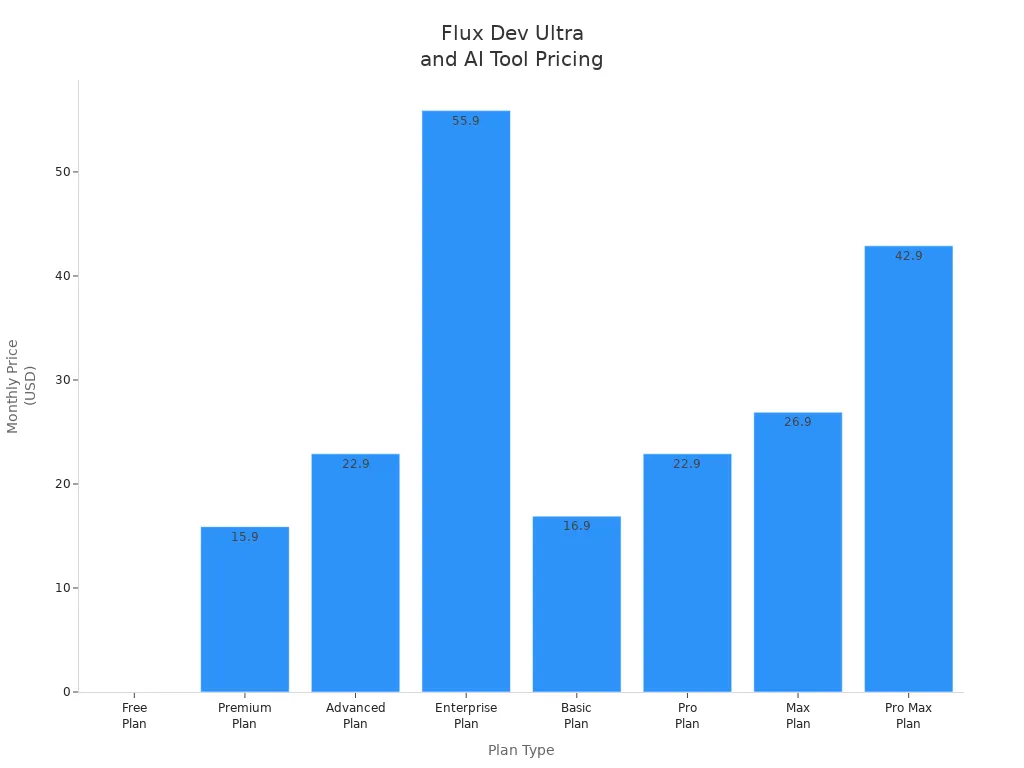
Karavideo.ai makes it easy for you to start with a free trial. You can test Flux Dev Ultra and see if it meets your needs. If you want more power, you can upgrade anytime.
Commercial vs. Open Source
You need to know if you can use Flux Dev Ultra for business. Karavideo.ai offers different versions. The Pro Ultra version has new rules. You must get a commercial license if you want to use it for business. The open-source version lets you use it for personal projects, but not for commercial work unless you buy a license. This change protects the creators and keeps the platform strong.
You also need to understand the token system. Each image costs about $0.086. You usually need 3.2 tries to get the perfect result. If you make 100 product images, you spend about $46.44. This includes failed attempts and high-resolution versions.
- You pay for each image you create.
- You need more tokens if you want high-quality or many images.
- You save money if you plan your prompts well.
Karavideo.ai gives you clear pricing and fair value. You get strong features and fast results. If you want to grow your business or creative projects, Flux Dev Ultra gives you the tools you need.
Security and Content Policies
Data Privacy
You want your information to be safe. Karavideo.ai cares about your privacy when you use Flux Dev Ultra. The platform is in charge of your data. This means karavideo.ai decides how your information is used. If you have questions, you can ask karavideo.ai for help. The privacy policy tells you what happens with your data, so you always know.
- Karavideo.ai gives you easy ways to use your privacy rights.
- You can talk to the service provider if you have a problem.
- If you think your rights are not respected, you can tell data protection authorities.
- The privacy policy explains how karavideo.ai uses your information, so you can see everything.
You control your data. Karavideo.ai lets you change or remove your information if you want.
Karavideo.ai builds trust by showing how Flux Dev Ultra keeps your privacy safe. You feel calm every time you use the platform.
Handling Inappropriate Content
You want to feel safe and happy online. Flux Dev Ultra uses smart filters to stop bad content. Karavideo.ai watches the platform to block harmful images. The system checks prompts and pictures for anything unsafe or rude. If you see something wrong, you can tell karavideo.ai. The team looks at reports and fixes problems fast.
- You help keep the platform safe when you report problems.
- Karavideo.ai listens to you and makes the filters better.
🚨 You get a safe place for your creative work. Karavideo.ai makes sure Flux Dev Ultra stays clean and good.
Karavideo.ai is special because it protects your privacy and keeps you safe. You can trust Flux Dev Ultra to give you a safe and strong experience every time.
Pros and Cons
Advantages for Developers
You want a tool that helps you work faster. Flux Dev Ultra gives you clear benefits if you use images a lot. Karavideo.ai makes things easy and quick. You finish your projects sooner.
- Ultra-fast image generation: Your images show up in seconds. You make more images and wait less.
- High-quality outputs: Your pictures look sharp and professional. Clients see the difference right away.
- Easy workflow: Karavideo.ai has a simple interface. You do not waste time learning new steps.
- Flexible prompt system: You control the style and details. You get what you want without extra effort.
- Batch processing: You make many images at once. This saves you hours on big projects.
- Strong support for creative edits: You change images easily. You do not need to start over.
Tip: If you want to impress clients or finish your work faster, Flux Dev Ultra and karavideo.ai help you reach your goals.
Drawbacks and Limitations
You need to know where Flux Dev Ultra might slow you down. Karavideo.ai works well for most users, but some limits can affect your workflow. The table below shows the most common drawbacks:
- You may not get full control over advanced settings. This can slow you down if you want custom results.
- Sometimes, Flux Dev Ultra does not understand your prompt. You need to give clear instructions.
- The default style fits commercial needs. If you want unique art, you must say what you want.
- Karavideo.ai limits resolution to 4MP. You need extra steps for bigger images.
- Local use can be slow if you work with large files or many references.
- Some tasks, like complex typography, need other tools.
Note: You get the best results when you use karavideo.ai for standard projects. For special needs, plan extra time or use other models.
Comparison with Alternatives
Competing AI Image Tools
You want to know how flux dev compares to other tools. Many platforms say they make images fast, but not all do. You see choices like NightCafe Studio, FluxPro.AI, Easy-Peasy.AI, MageSpace, FAL, EverArt.AI, and HeyGlif. Each tool has its own features and prices. You can look at the table below to compare them:
Industry reviews often compare flux dev with Flux 2 and Seedream 4.5. These tools compete for your attention. You want the best value and performance.
- Flux 2
- Seedream 4.5
Where Flux Dev Ultra Excels
You want results that make your creative work look great. Flux dev ultra beats other tools in many ways. You get super-fast speed, high-quality images, and strong text-to-image features. Karavideo.ai powers flux dev ultra, so you get reliable results every time.
You get images fast. You see sharp details and clear text. You control style and content with your prompts. Karavideo.ai helps your workflow, so you stay productive. You do not waste time waiting or fixing mistakes.
If you want a tool that gives you speed, quality, and control, flux dev ultra is a top choice. You get more done with less effort. Karavideo.ai helps you reach your creative goals faster.
Who Should Use Flux Dev Ultra
Best User Profiles
You want a tool that helps you reach your creative goals. Flux Dev Ultra is best for people who need fast and good images with little work. If you make things for social media, marketing, or design, you will like how quick it is. You can use karavideo.ai to make cool pictures for your brand or business. The platform helps you finish projects on time and impress clients.
- Content creators who need images fast
- Designers who want sharp pictures for websites or ads
- Small business owners who need product visuals
- Students or teachers who want simple AI tools
- Anyone who wants to make portraits or creative images without hard software
You get the most from karavideo.ai if you want speed and clear results. The platform lets you make portraits and other visuals that look great. You do not need to spend hours fixing mistakes or editing. Karavideo.ai helps you stay creative and get more done every day.
Tip: Try batch image generation on karavideo.ai if you want to make more images fast. You will save time and finish more work.
Who Might Not Benefit
Flux Dev Ultra is not right for everyone. Some people want more control or special features. If you need to change every detail or work on new ideas, you may find the platform limited. The table below shows who might not benefit and why:
You may want to try other tools if you need advanced settings, special art styles, or complex text in your images. Karavideo.ai is made to be easy and fast, not for deep changes. If your work needs special effects or rare art, you might need something else.
Note: Karavideo.ai works well for most creative jobs, but you should pick the tool that fits your needs.
Practical Tips
Getting Started
You want to get the most from Flux Dev Ultra right away. Karavideo.ai makes it easy for you to start strong. You can follow these expert-backed tips to see better results and avoid wasted time.
You can use karavideo.ai to test different prompt styles. You will see how Flux Dev Ultra responds to your changes. You do not need a big dataset. You can start with just a few images and still get great results. Karavideo.ai helps you move fast and stay creative.
Tip: Write prompts like you talk. Tell Flux Dev Ultra what you want in detail. You will see better images every time.
Common Pitfalls
You want to avoid mistakes that slow you down. Many users make the same errors when they start with Flux Dev Ultra on karavideo.ai. You can learn from these and save time.
You should focus on what matters. Karavideo.ai gives you powerful tools, but you do not need to use every feature at once. Start simple. Add more only when you need it. This way, you get the best from Flux Dev Ultra without stress.
Note: If you keep your workflow clear and your prompts simple, you will see better images and finish projects faster with karavideo.ai.
Methodology and Sources
Review Process
You want real answers from a review. I used Flux Dev Ultra on karavideo.ai with different devices. I tried it on phones and computers. I made images for social media and business. I also made pictures for personal projects. I tested batch generation and editing tools. I changed prompts to see what happens. I watched how fast it worked and how good the images looked. I checked if it was easy to use. I looked at how karavideo.ai helps you start and use the platform. I compared it to other AI image tools. I tried both the free trial and paid plans to see if they are worth it.
You get honest feedback because I used Flux Dev Ultra like you would. I looked for problems and good things. I asked other users what they thought about karavideo.ai. I made sure the review covers what matters most. I focused on speed, image quality, and how easy it is to use. I checked security and content rules. I looked at how karavideo.ai keeps your data safe and protects your work.
Tip: You can trust this review. I used Flux Dev Ultra just like you might. I wanted to see if karavideo.ai helps you finish projects faster.
References
You want facts, not guesses. I used these sources to make sure the review is right:
- User feedback from karavideo.ai forums and surveys
- Official docs for Flux Dev Ultra and karavideo.ai
- Industry reviews with NightCafe Studio, Easy-Peasy.AI, MageSpace, and others
- Pricing tables and feature lists from karavideo.ai
- Security and privacy policies from karavideo.ai
You get a review based on real data. I used trusted sources and tested everything myself. You can feel sure when you pick Flux Dev Ultra and karavideo.ai for your creative work.
You want a tool that saves time and delivers results. Flux Dev Ultra on karavideo.ai gives you fast, high-quality images with easy steps. You get speed, sharp visuals, and a smooth workflow. Some limits exist, like less control for advanced users and a 4MP cap. If you create content, design, or run a business, karavideo.ai fits your needs.
Try Flux Dev Ultra on karavideo.ai today. See how much faster you finish your creative work!
FAQ
How fast can you generate images with Flux Dev Ultra?
You get images in seconds. Flux Dev Ultra on karavideo.ai delivers results almost instantly. You do not wait long. This speed helps you finish projects faster and impress your clients.
Can you use Flux Dev Ultra for commercial projects?
Yes, you can use Flux Dev Ultra for business. You need a commercial license from karavideo.ai. This license lets you create images for your brand, products, or marketing without worry.
What makes Flux Dev Ultra better than other AI image tools?
Flux Dev Ultra gives you high-quality images, fast results, and an easy workflow. Karavideo.ai supports you with strong features and a simple interface. You stay productive and creative every day.
Is there a free trial for Flux Dev Ultra on karavideo.ai?
Yes! Karavideo.ai offers a free plan. You get five daily credits to test Flux Dev Ultra. Try it before you buy. See how it fits your needs.
How do you keep your data safe on karavideo.ai?
Karavideo.ai protects your privacy. You control your data and can change or remove it anytime. The platform uses smart policies to keep your information safe while you use Flux Dev Ultra.