Best ai video creation tools in 2026
The best ai video creation tools in 2026 deliver just that. Platforms like karavideo.ai now let you turn your ideas into immersive videos with a few clicks
You want effortless content. The best ai video creation tools in 2026 deliver just that. Platforms like karavideo.ai.ai now let you turn your ideas into immersive videos with a few clicks. Demand for video content keeps rising, and innovative features drive the industry forward.
· Generative AI adoption in content creation soared from 33% in 2023 to 71% in 2024.
· By 2025, nearly three-quarters of organizations used generative AI for content.
· In 2024, 78% of organizations reported using AI in at least one business function.
Choose tools that match your goals—social media, marketing, education, or film—and start creating videos that stand out.
Key Takeaways
· AI video creation tools simplify the video-making process, allowing anyone to create professional content quickly.
· Choose tools that align with your specific goals, whether for social media, marketing, education, or film production.
· Automation in AI tools can save up to 75% of production time, enabling faster content generation.
· Many platforms offer free trials, allowing you to test features before committing to a paid plan.
· Look for tools that provide multi-engine access and character consistency for more dynamic storytelling.
· AI video tools can enhance engagement rates by up to 300% with high-quality, consistent videos.
· Consider the pricing structure of each tool, as some use credit-based systems while others offer straightforward subscriptions.
· Experiment with different styles and formats using AI tools to find what resonates best with your audience.
AI Video Tools Explained
What Are AI Video Creation Tools?
AI video creation tools help you turn your ideas into videos with little effort. These platforms use artificial intelligence to automate many steps in the video-making process. You can start with a text prompt, an image, or even a rough video clip. The tool then generates a polished video for you. Unlike traditional editing software, these tools focus on speed and simplicity. You do not need advanced editing skills or hours of training.
Here is a quick look at the core functionalities you will find in the best ai video creation tools in 2026:
Why Use AI Video Tools in 2026?
You want to create videos faster and easier than ever before. AI video tools automate repetitive tasks and speed up your workflow. These platforms come with intuitive interfaces, so you can focus on your message instead of learning complex software. You can generate drafts quickly, test new ideas, and share content across multiple platforms with just a few clicks.
· AI video creation tools automate cutting, transcription, and basic enhancements.
· You can generate short clips from longer videos for social media.
· These tools ensure consistency in style and format, which helps you build a strong brand identity.
Traditional video editing software gives you more control but takes much longer to master. You spend hours on manual edits and technical details. With AI tools, you get results in minutes, not days.
Key Benefits for Creators
You gain several advantages when you switch to AI video tools:
· Save up to 75% of your production time by automating tedious tasks.
· Create personalized content at scale, reaching more viewers with less effort.
· Reduce costs by letting AI handle repetitive work.
· Increase engagement rates by up to 300% with high-quality, consistent videos.
· Experiment with different styles and formats without extra expense.
· Enjoy accessibility—no technical skills required, so anyone can create professional videos.
Tip: The best ai video creation tools in 2026 let you focus on creativity, not complexity. You can bring your ideas to life and stay ahead in the fast-paced world of digital content.
1. karavideo.ai.ai
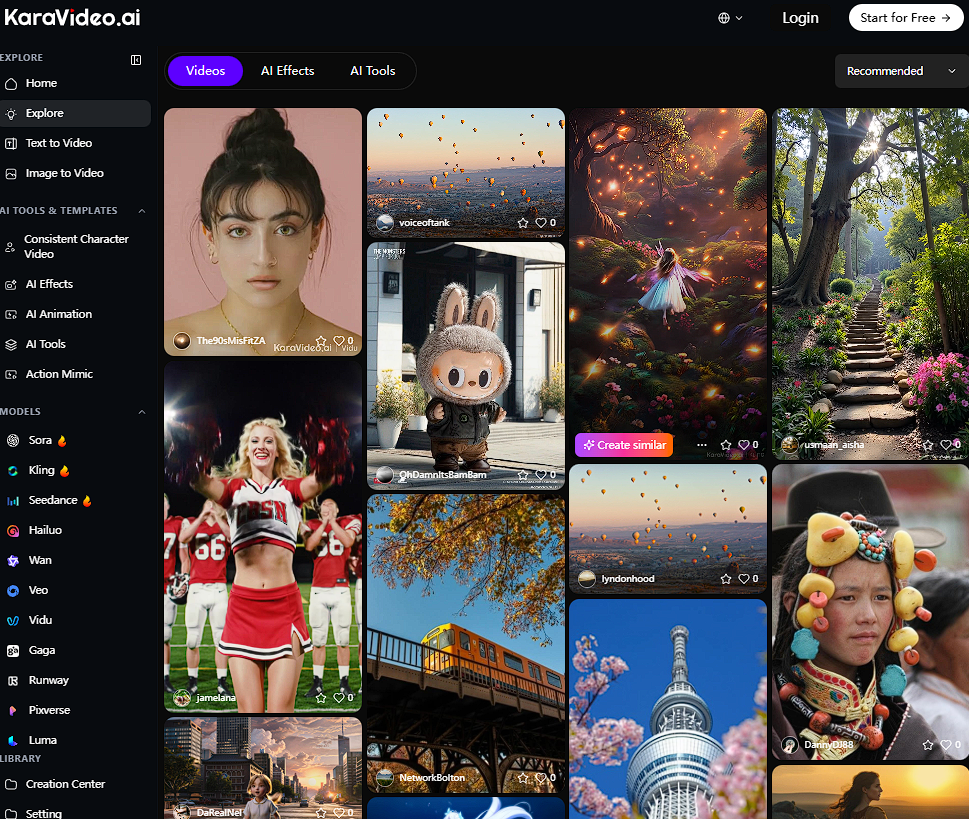
karavideo.ai Overview
You want a tool that makes video creation simple and powerful. karavideo.ai stands out as a revolutionary platform for creators who want to turn ideas into stunning videos with minimal effort. You can start with text, images, or clips and watch your vision come alive in minutes. karavideo.ai brings together advanced AI engines, a user-friendly dashboard, and cinematic features. You get access to the latest models and effects, so your content always looks fresh and professional.
Features
Multi-Engine Access
karavideo.ai gives you access to multiple AI video engines under one subscription. You can use Sora, Veo, and Runway without juggling different accounts. This feature saves you time and money. You choose the engine that fits your project, describe your vision, and generate high-quality videos in just a few clicks.
Character Consistency
You want your characters to look the same throughout your video. karavideo.ai lets you upload reference images and keeps your characters consistent from start to finish. This feature helps you tell better stories and build a strong brand identity. You can lock the start and end frames, and karavideo.ai animates the in-between with smooth transitions.
Cinematic Animation
karavideo.ai brings cinematic motion to your videos. You can animate photos, create dynamic shots, and add professional transitions. The platform uses AI to generate realistic movement, lighting, and effects. Your videos look polished and engaging, ready for any audience.
Audio Integration
You need immersive sound to match your visuals. karavideo.ai integrates audio seamlessly, using advanced models like Veo 3 to generate sound effects and dialogue. You can sync music, voiceovers, and effects with your video for a complete experience.
Cartoon Generator
If you love anime or want animated content, karavideo.ai offers an AI cartoon generator. You can create videos in styles inspired by famous anime creators. This feature opens new creative possibilities for social media, ads, or storytelling.
Use Cases
karavideo.ai fits many needs. You can create:
· Viral social media clips that grab attention
· Engaging ads for products or services
· Educational videos with animated explanations
· Short films with consistent characters and cinematic effects
Tip: karavideo.ai keeps your workflow simple and your content professional. If you want to stay ahead, choose one of the best ai video creation tools in 2026 for effortless results.
Limitations
You want to know what to expect before you choose karavideo.ai. While this platform offers impressive features, you should consider a few limitations that users have reported:
· Simple prompts sometimes produce generic videos. You may notice that the results lack a personal touch.
· karavideo.ai’s AI does not have personal experiences or emotions. This can affect the depth and authenticity of your content.
· The system relies on pattern matching. It does not think or understand like a human creator.
· karavideo.ai’s knowledge is not current. The AI does not access real-time information from the internet.
Note: These limitations are common among many AI video platforms. You can often overcome them by using more detailed prompts and adding your own creative direction.
Pricing
You want a tool that fits your budget and delivers value. karavideo.ai offers flexible pricing plans so you can choose the best option for your needs. Here is a quick overview:
You can start with the Free plan to test the platform. Upgrade to Creator or Pro for more advanced features and higher-quality exports. The Studio plan gives you full access for professional production and team projects.
Tip: karavideo.ai’s pricing makes it easy to scale your video production. You get access to the best ai video creation tools in 2026 without breaking the bank.
2. Kling AI
Kling AI Overview
You want a video creation tool that gives you creative freedom and saves you time. Kling AI stands out as a multi-modal engine that lets you generate high-quality videos from text, images, or existing clips. You do not need advanced editing skills. Kling AI helps you create wild visuals, cinematic scenes, and interactive content in minutes. The platform updates regularly, adding new features based on user feedback. Over 10 million videos have been generated since June 2024, showing Kling AI’s popularity among creators, brands, and educators.
Kling AI helps you produce more content quickly, so you can grow your audience and boost engagement.
Features
Multi-Modality
You can create videos from text prompts, images, or video clips. Kling AI supports complex camera movements, realistic physics, and style transfers. You get flexibility to match your creative vision.
Motion Brush
You control motion with a simple brush tool. Paint over areas to animate gestures, facial expressions, or objects. This feature makes your videos feel natural and dynamic.
Lip-Sync Pro
You want your characters to speak convincingly. Kling AI’s Lip-Sync Pro matches mouth movements to voiceovers in multiple languages. Your videos sound authentic and look professional.
Virtual Try-On
You can upload clothing designs and see them mapped onto 3D models. Kling AI generates multi-angle try-on videos, perfect for e-commerce, fashion, and advertising.
Tip: Kling AI’s features let you create professional videos without hiring a freelancer or spending days on edits.
Use Cases
Kling AI works for many industries and content types. You can use it for:
· Marketing and Advertising: Make personalized video ads that boost engagement and conversion.
· Educational Content: Create interactive lessons and instructional videos to help students learn.
· Entertainment: Produce high-fidelity animations and cinematic stories for your audience.
· Gaming and VR: Build immersive cutscenes and game trailers to speed up prototyping.
You can start with the free tier if you are a beginner. Upgrade to Pro or Premier plans for advanced features and API access. Kling AI’s flexibility and speed make it one of the best ai video creation tools in 2026 for creators who want effortless results.
Limitations
You want to know what to expect before you invest in Kling AI. Every tool has its drawbacks, and Kling AI is no exception. Many users and reviewers have pointed out several challenges that you should consider. Here is a quick overview in table format:
Note: You should weigh these limitations against Kling AI’s unique features. If you need fast support, predictable results, or higher resolution, you may want to compare Kling AI with other platforms.
Pricing
You want a pricing plan that fits your needs and budget. Kling AI uses a complex, credit-based pricing structure. You buy credits and spend them on video generations, upgrades, or advanced features. This system gives you flexibility, but it can be confusing if you are new to AI video tools.
Here is a comparison of Kling AI’s pricing structure with other popular platforms:
You may find Kling AI’s pricing less transparent than other tools. Credits can expire, and you may need to track your usage closely. If you want a simple monthly subscription, platforms like DomoAI or Runway might suit you better.
Kling AI offers a free tier for beginners. You can test basic features and generate short clips. Paid plans unlock higher resolution, advanced editing, and priority access. You should review the details before you commit, especially if you plan to use Kling AI for business or high-volume projects.
Tip: Always check the terms for credit expiration and cancellation policies. If you value flexibility and advanced features, Kling AI can be a powerful choice. If you prefer simplicity and predictable costs, compare other platforms before making your decision.
3. Huixiang
Huixiang Overview
You want a platform that brings your creative vision to life with speed and quality. Huixiang, developed by Baidu, gives you the power to turn ideas into cinematic videos in just a few steps. You can start with a simple image or a text prompt and watch Huixiang generate dynamic, professional-grade videos. This platform appeals to creators, filmmakers, and businesses who want Hollywood-level results without the high cost or technical barriers.
If you want to impress your audience and save time, Huixiang stands out as a smart choice.
Features
Video Synthesis
You can transform a single static image into a lively, 10-second video with professional visuals. Huixiang’s advanced MuseSteamer models let you choose the version that fits your needs—Turbo for speed, Lite for simplicity, or Pro for the highest quality. You get flexibility and control, whether you need a quick draft or a polished final cut.
Cinematic Tools
Huixiang gives you cinema-quality output every time. You can create 1080p high-definition videos with movie-level aesthetics and smooth camera movements. The platform generates synchronized visuals, sound effects, and even voice-over dialogue, all in one place. You do not need to juggle multiple apps or hire extra help.
Here’s a quick look at the features that set Huixiang apart:
Workflow & Collaboration
You can work with your team in real time. Huixiang’s collaborative studio lets you assign roles, share projects, and track progress from a single dashboard. You can manage directors, editors, and animators all in one place. Version control keeps your work organized and secure.
Global Access
You can access Huixiang from anywhere. The platform supports 12 languages and offers fast rendering with servers optimized for the Asia-Pacific region. You get zero watermarks on your final videos, so your brand stays front and center.
Use Cases
Huixiang fits a wide range of creative needs. You can:
· Produce viral social media clips that capture attention.
· Generate personalized ads for your business at a fraction of the usual cost.
· Create animated explainer videos for education or training.
· Speed up film pre-visualization and post-production for studios.
Choose Huixiang if you want to join the ranks of creators using the best ai video creation tools in 2026. You will save time, cut costs, and deliver stunning results every time.
Limitations
You want to know what challenges you might face before choosing Huixiang. Every tool has its limits, and understanding them helps you make the best decision for your projects.
· Learning Curve: You may need some time to get used to the advanced features. If you are new to AI video tools, the wide range of options can feel overwhelming at first.
· Internet Connection: Huixiang works best with a stable, fast internet connection. Slow speeds can affect rendering times and your overall experience.
· Language Support: While Huixiang supports 12 languages, you might find that some advanced features work best in Chinese or English. Other languages may have limited support for voiceovers or templates.
· Rendering Queue: During peak hours, you could experience longer wait times for video processing. High demand sometimes causes delays, especially for 4K exports.
· Hardware Requirements: For the smoothest workflow, you need a modern device. Older computers or mobile devices may struggle with real-time editing or previewing high-resolution videos.
Note: These limitations are common among the best ai video creation tools in 2026. You can often overcome them by starting with simple projects and exploring advanced features as you gain confidence.
Pricing
You want a tool that delivers value without breaking your budget. Huixiang stands out for its cost-effective pricing, making high-quality video creation accessible to everyone.
Huixiang uses a pay-per-use model. You pay only for what you create, so you control your spending. The Turbo version of MuseSteamer 2.0 costs just RMB 1.4 for every 5 seconds of video. This price is about 70% of what you would pay for similar tools in the market. You save money while still getting professional results.
Here’s a quick look at Huixiang’s pricing options:
You can start with the Turbo version for fast, affordable results. Upgrade to Pro if you need cinematic quality or longer videos. Huixiang’s flexible pricing lets you scale your production as your needs grow.
Tip: If you want to maximize your budget and still create stunning videos, Huixiang offers one of the best deals among AI video platforms today.
4. Runway
Runway Overview
You want a video creation platform that makes editing fast and easy. Runway gives you powerful AI models that transform your workflow. You can create, edit, and enhance videos with just a few clicks. The platform is user-friendly, so you do not need advanced skills to get started. Runway appeals to both professionals and hobbyists who want to produce high-quality content quickly. You get access to tools that save time and boost creativity. Runway stands out among the best ai video creation tools in 2026 because it combines advanced technology with simplicity.
Runway helps you turn your ideas into polished videos without the usual hassle.
Features
Text-to-Video
You can generate videos from simple text prompts. Describe your scene, and Runway’s AI brings it to life. This feature lets you create cinematic and dramatic visuals for storytelling. You control the style and mood by adjusting your prompt. Runway’s text-to-video tool makes it easy to experiment with new ideas and produce content for social media or marketing.
Image-to-Video
You want to animate still images and make them engaging. Runway lets you upload photos and turn them into dynamic videos. You can add movement, effects, and transitions. The platform uses AI to animate faces, objects, and backgrounds. This feature works well for creating expressive characters, landscape flythroughs, and even anime-style clips. You can repurpose old photos and give them new life.
AI Editing
Runway gives you advanced editing tools powered by AI. You can remove objects or backgrounds from your videos with a single click. The platform fills in the background seamlessly, so your edits look natural. You can apply style transfers to change the look of your footage. Runway’s short-form video editing tools help you create content for TikTok, Instagram, and other platforms. You save hours with AI-powered rotoscoping and background removal.
Here’s a quick table showing why Runway is a preferred choice for AI-powered video editing:
Use Cases
You can use Runway for many creative projects. The platform supports AI video generation, cinematic scenes, and photorealistic visuals. You can craft expressive characters and add special effects to your videos. Runway helps you repurpose footage, use green screen technology, and create immersive landscape flythroughs. You can also generate anime and surreal content for unique storytelling.
Runway gives you the flexibility to create content for any platform or audience. You can push creative boundaries and deliver professional results every time.
Limitations
You want a tool that helps you create videos without frustration. Runway offers many advanced features, but you should know about its main drawbacks before you decide. Users have shared feedback that highlights several important limitations:
· High costs compared to the quality of output. You may find that the price does not always match the results you get.
· Poor user experience with support. Many users report that customer service gives generic responses and does not solve problems quickly.
· Account termination practices. Some users have had their accounts closed without warning or refunds, which can disrupt your projects.
· Technical issues. You might see inconsistent video resolution or motion glitches in your final exports.
Note: You should weigh these limitations against the benefits. If you need reliable support or want to avoid technical surprises, consider testing Runway with a free plan before upgrading.
Pricing
You want clear pricing so you can plan your budget. Runway uses a tiered subscription model that fits different needs, from individuals to large teams. You can start for free or choose a plan with more features as you grow.
Here’s a quick comparison of Runway’s main plans:
You can try Runway for free to see if it fits your workflow. If you need more credits or advanced features, upgrade to Standard, Pro, or Unlimited. The Unlimited plan gives you the most flexibility for high-volume production. Enterprise plans offer custom solutions for large organizations.
Tip: Choose the plan that matches your content goals and team size. Runway’s flexible pricing helps you scale your video creation as your needs grow.
5. Sora
Sora Overview
You want a video creation tool that brings your stories to life with originality and emotion. Sora stands out as a next-generation AI video platform that lets you turn your ideas into cinematic visuals in just minutes. You can start with a simple text prompt or upload an image, and Sora generates completely original footage—no recycled stock clips or generic templates. This tool gives you the power to create videos in any style you imagine, from black-and-white classics to vibrant 3D animations. Sora helps you capture attention, spark emotion, and deliver your message with impact.
Features
Story-Driven Visuals
You need your videos to tell a story that feels unique. Sora delivers this by generating original footage from your written prompts. You do not have to rely on existing clips or stock images. Sora creates every frame from scratch, so your content always feels fresh and authentic.
· Sora generates original footage directly from your text prompts, giving you full creative control.
· You can choose from a wide range of styles, including black-and-white, animated, or 3D, to match your vision.
· Sora lets you upload still images and instantly turn them into dynamic video scenes, speeding up your creative process.
With Sora, you can bring any concept to life, whether you want a dramatic film sequence or a playful animated short.
Emotional Content
You want your audience to feel something when they watch your videos. Sora uses advanced AI to add emotional depth to every scene. The platform analyzes your prompts and images, then crafts visuals that match the mood you want—joy, suspense, wonder, or excitement. This emotional layer helps you connect with viewers and make your message unforgettable.
Use Cases
You can use Sora for a wide range of projects. Here are some of the most popular ways creators like you use this tool:
· Marketing and Advertising: Create engaging video ads for social media that boost customer engagement and drive sales.
· Education: Visualize complex ideas and make learning more accessible for students with personalized, animated lessons.
· E-commerce and Retail: Generate dynamic product demos and personalized recommendation videos to improve the shopping experience.
· Entertainment: Build realistic storyboards and pre-visualizations for films and shows, helping you plan scenes and pitch ideas.
Did you know? By 2026, 72% of companies will use AI video tools like Sora, and video ad spending is set to reach $456 billion. You can stay ahead of the curve by adopting Sora for your next project.
Limitations
You want to know what challenges you might face before choosing Sora for your video projects. Every AI tool has its limits, and Sora is no exception. Understanding these will help you make the best choice for your needs.
· Physical Realism: Sora sometimes creates scenes where objects move in ways that do not follow the laws of physics. You may notice characters or items interacting in ways that look unnatural.
· Temporal Consistency: When you generate longer videos, Sora can struggle to keep objects and scenes consistent from frame to frame. This means a character’s appearance or the background might change unexpectedly during a sequence.
· Computational Requirements: Sora needs a lot of processing power. If you do not have access to high-end hardware or cloud resources, you may find it hard to generate longer or more complex videos.
· Quality Over Duration: Sora focuses on delivering high-quality short clips. If you try to create longer videos, you may see a drop in quality or more visual glitches.
· Memory Demands: Each extra second of video increases the processing load by up to 100 times compared to static images. This can slow down your workflow and limit how much you can create at once.
· Ethical Concerns: Like many advanced AI tools, Sora can generate content that is misleading or potentially harmful. You need to use it responsibly and review your videos before sharing them.
Note: Sora’s strengths shine in short, story-driven videos. If you want longer or highly realistic scenes, you may need to combine Sora with other tools or add manual edits.
Pricing
You want a clear idea of what Sora will cost before you get started. Sora uses a subscription-based pricing model, making it easy for you to choose a plan that fits your needs and budget.
You can start with the Free plan to explore Sora’s features. Upgrade to Creator or Pro for higher quality and more export options. The Enterprise plan gives you everything you need for large-scale production and team projects.
Tip: Sora’s flexible pricing lets you scale your video creation as your needs grow. You get powerful AI tools without a huge upfront investment.
6. Veo
Veo Overview
You want your videos to look professional and feel immersive. Veo gives you the power to create high-quality content in minutes. This platform targets production houses, studios, and creative teams. You get next-level realism, fast processing, and integrated audio. Veo helps you skip the long hours of traditional shoots. You can produce polished videos quickly and impress your audience every time.
Veo stands out for its speed and realism. You can create cinematic scenes or nature-heavy visuals that look stunning. If you want to boost your creative output, Veo is the tool you need.
Features
High-Quality Video
You demand realism and smooth visuals. Veo delivers with advanced facial animation, solid lighting, and seamless camera moves. You do not need a full crew or expensive equipment. Veo’s AI handles the details, so you focus on your story.
Here is a quick look at Veo’s most notable features:
You get exceptional realism in cinematic and nature-heavy scenes. Veo’s processing speed lets you finish projects faster. You can trust the platform to deliver professional results every time.
Audio Generation
You want your videos to sound as good as they look. Veo integrates audio and lip-syncing directly into your scenes. The platform matches voices to facial movements, making your characters feel alive. You do not need to spend extra time syncing sound. Veo’s built-in audio enhances immersion and keeps your workflow simple.
· Audio fits each scene perfectly.
· Lip-syncing is accurate and natural.
· You save time and avoid technical headaches.
Tip: Use Veo’s audio generation to create videos that engage viewers and tell your story with impact.
Use Cases
You want to know how Veo can help you reach your goals. Veo supports a wide range of creative and professional applications. Many organizations use Veo to improve analysis, coaching, and performance.
You can use Veo to review matches, analyze training, and develop talent. Veo helps you deliver insights that drive improvement. If you want to create cinematic content or support your team’s growth, Veo gives you the tools to succeed.
Choose Veo if you want fast, realistic video production and integrated audio. You will save time, impress your audience, and achieve your creative goals.
Limitations
You want to know what challenges you might face with Veo before you invest your time and money. Veo offers impressive video quality and speed, but you should consider a few important limitations reported by users:
· Daily generation limits: You can create about 3 Veo 3 Fast videos each day. If you use Veo 2, you get around 30 videos per month. These limits may slow down your workflow if you need high-volume production.
· Regional access restrictions: Veo 3 is not available in some regions, including the UK and the entire European Union. If you live in these areas, you may not be able to use the latest features, which can be frustrating.
· Credit-based usage: As a Pro user, you receive 1,000 monthly AI credits. These credits are shared across Veo’s tools. You must track your usage closely, or you may run out of credits before the month ends.
Tip: Always check your region and credit balance before starting a big project. If you need more videos, plan your production schedule to avoid hitting daily or monthly limits.
Pricing
You want a tool that fits your budget and delivers value. Veo uses a pay-per-second pricing model, which makes it easy to estimate your costs. You pay only for what you create, so you control your spending.
Here’s a quick comparison of Veo’s pricing with other leading AI video platforms:
You save money with Veo if you produce moderate amounts of content. For example, 10 Veo 3.1 Fast videos at 15 seconds each cost only $22.50. Sora 2 Plus hits its credit limit quickly and forces an upgrade to Pro, which costs $200. Veo gives you more flexibility and lower costs for most projects.
Note: Veo’s pricing structure helps you scale your video production without overspending. You pay for the exact length you need, so you never waste money on unused features.
If you want high-quality videos, native audio, and predictable costs, Veo stands out as a smart choice among the best AI video creation tools in 2026.
7. DomoAI
DomoAI Overview
You want a tool that makes video creation fast, flexible, and reliable. DomoAI delivers on all fronts. This platform uses advanced AI to help you generate videos from text, images, or even rough sketches. You do not need to master editing software or spend hours on manual work. DomoAI gives you a simple dashboard where you can upload your ideas and watch them turn into polished videos. You can trust DomoAI to handle everything from short social clips to longer marketing content. The platform updates often, so you always get the latest features and models.
DomoAI empowers you to create more content in less time. You can focus on your message and let the AI handle the technical details.
Features
Overall Performance
You want results that look professional every time. DomoAI stands out for its speed and quality. The platform uses powerful AI models that process your requests quickly. You can generate a 10-second video in just a few minutes. The output looks sharp, with smooth transitions and clear visuals. DomoAI supports high-definition exports, so your videos always look crisp on any device.
· Fast video generation saves you hours.
· High-definition output ensures your content stands out.
· Reliable processing means fewer errors and smoother workflows.
Versatility
You need a tool that adapts to your creative needs. DomoAI offers unmatched versatility. You can start with a text prompt, an image, or even a storyboard. The platform supports a wide range of styles, from realistic footage to animated shorts. You can mix and match templates, effects, and audio tracks to create unique videos every time.
Here’s what makes DomoAI versatile:
With DomoAI, you can experiment with different formats and styles. You do not need to stick to one type of video.
Use Cases
You can use DomoAI for almost any video project. Here are some popular ways creators like you use this tool:
· Social Media: Make eye-catching clips for TikTok, Instagram, or YouTube.
· Marketing: Produce product demos, explainer videos, and ads that convert viewers into customers.
· Education: Create animated lessons or tutorials that keep students engaged.
· Business: Generate training videos, company updates, or event recaps with ease.
Tip: DomoAI helps you scale your content production. You can reach more people and grow your brand without extra effort.
Limitations
You want to know what to expect before you choose DomoAI for your video projects. Every tool has its challenges. DomoAI is no exception. Understanding these will help you make the best decision for your needs.
· Limited Free Tier: You get only a few free generations each month. If you want to create more videos, you must upgrade to a paid plan.
· Watermarks on Free Exports: Free videos include a watermark. You need a subscription to remove it and unlock professional exports.
· Occasional Output Inconsistencies: Sometimes, the AI may not follow your prompt exactly. You might see unexpected changes in style or content.
· No Offline Editing: DomoAI works entirely online. You need a stable internet connection to access all features and export your videos.
· Rendering Queue Delays: During busy hours, you may wait longer for your videos to finish processing. This can slow down your workflow.
· Limited Customization for Advanced Users: If you want deep manual control over every detail, you may find DomoAI less flexible than traditional editing software.
· Language Support: DomoAI supports major languages, but some advanced features work best in English.
Tip: You can overcome most of these limitations by starting with a paid plan and using detailed prompts. If you need full creative control, consider combining DomoAI with other editing tools.
Pricing
You want a pricing plan that matches your budget and your creative goals. DomoAI keeps things simple and transparent. You can start for free and upgrade as your needs grow.
Here’s a quick look at DomoAI’s pricing options:
You can try DomoAI for free to see if it fits your workflow. Upgrade to Creator or Pro for more power and flexibility. The Enterprise plan gives you everything you need for large-scale production and team projects.
Call to Action: Choose the plan that fits your needs. Start creating stunning videos with DomoAI today and take your content to the next level!
8. RecCloud
RecCloud Overview
You want a video creation tool that streamlines your entire workflow. RecCloud delivers an all-in-one platform designed for creators who value speed, simplicity, and versatility. You can produce, edit, and share videos without switching between multiple apps. RecCloud gives you a unified dashboard where you manage every step of your project. You save time and avoid confusion. The platform updates regularly, so you always get the latest features and improvements.
RecCloud helps you focus on your ideas, not on technical details. You get more done in less time.
Features
All-in-One Workflow
You need a tool that covers every part of video production. RecCloud combines recording, editing, and exporting in one place. You can capture your screen, webcam, or both at once. The built-in editor lets you trim clips, add transitions, and insert text overlays. You do not need to download extra software or learn complicated steps.
· Record your screen and webcam with one click.
· Edit videos directly in your browser.
· Export finished projects in multiple formats.
Here’s a quick look at how RecCloud’s workflow compares to traditional methods:
Tip: Use RecCloud’s all-in-one workflow to create professional videos faster. You spend less time switching tools and more time creating.
Productivity Tools
You want to boost your productivity and create content that stands out. RecCloud offers smart tools that help you work efficiently. You can use AI-powered transcription to turn speech into text. The platform provides automatic subtitles, making your videos accessible to more viewers. You can also use templates for intros, outros, and overlays. These features help you maintain a consistent style and save hours on editing.
· AI transcription for fast subtitle creation.
· Ready-made templates for quick branding.
· Batch processing to handle multiple videos at once.
RecCloud’s productivity tools let you scale your content creation. You reach more people and grow your brand with less effort.
Use Cases
You can use RecCloud for many types of projects. The platform adapts to your needs, whether you create content for social media, education, or business.
· Social Media: Make short, engaging clips for TikTok, Instagram, or YouTube.
· Education: Record lessons, tutorials, or explainer videos with subtitles.
· Business: Produce training materials, product demos, or webinars.
· Marketing: Create branded videos with intros and outros for campaigns.
Choose RecCloud if you want a flexible, all-in-one solution. You get powerful features that help you create, edit, and share videos with ease.
Limitations
You want to know what challenges you might face before choosing RecCloud. Every tool has its drawbacks, and RecCloud is no exception. Understanding these limitations helps you make the best decision for your workflow.
· Internet Dependence: You need a stable internet connection to use RecCloud. If your connection drops, you may lose progress or experience delays.
· Limited Advanced Editing: RecCloud focuses on speed and simplicity. You may find that advanced editing features, like multi-track timelines or complex effects, are not available.
· Export Restrictions on Free Plan: The free version adds a watermark to your videos. You must upgrade to remove it and unlock higher export quality.
· Storage Limits: Free and lower-tier plans come with limited cloud storage. You may need to delete old projects or upgrade if you create a lot of videos.
· Rendering Queue Delays: During busy hours, you might wait longer for your videos to process. High demand can slow down your workflow.
· Browser Compatibility: RecCloud works best on modern browsers. If you use an outdated browser, you may run into glitches or missing features.
· Template Variety: While RecCloud offers templates, the selection may feel limited compared to some competitors. You might need to customize more to get the look you want.
Note: You can overcome most of these limitations by starting with simple projects and upgrading your plan as your needs grow. If you want advanced editing or unlimited storage, consider combining RecCloud with other tools.
Pricing
You want a plan that fits your budget and gives you the features you need. RecCloud offers flexible pricing so you can start for free and upgrade as you grow.
You can start with the Free plan to test RecCloud’s features. Upgrade to Creator or Pro for higher quality and more storage. The Business plan gives you everything you need for large teams and unlimited production.
Tip: Choose the plan that matches your content goals. RecCloud’s flexible pricing helps you scale your video creation without breaking the bank. Start with a free trial and see how much easier video production can be!
9. Synthesia
Synthesia Overview
You want to create professional videos without hiring actors or renting a studio. Synthesia gives you that power. This platform uses advanced AI to turn your text into engaging videos with lifelike avatars. You can choose from a wide range of digital presenters who speak multiple languages. Synthesia helps you save time, cut costs, and deliver your message with impact. You do not need video editing skills. You simply type your script, select an avatar, and generate a polished video in minutes.
Synthesia stands out as a leader in AI video creation. You get consistent quality, fast turnaround, and a user-friendly experience.
Features
AI Avatars
You want your videos to look authentic and connect with viewers. Synthesia offers over 150 AI avatars, each designed to deliver your message with clarity and emotion. You can pick an avatar that matches your brand or audience. These avatars use advanced lip-sync technology, so their speech looks natural in over 120 languages and accents.
· Choose from a diverse library of avatars.
· Customize avatars with your brand colors and logos.
· Use your own voice or select from realistic AI voices.
Tip: You can even create a custom avatar that looks and sounds like you or your spokesperson. This feature boosts trust and recognition for your brand.
Professional Video Creation
You want to produce videos that look like they came from a studio. Synthesia gives you powerful tools to do just that. You can add text, images, background music, and animations with a few clicks. The platform includes ready-made templates for training, marketing, and internal communications.
· Drag-and-drop editor for easy customization.
· Built-in templates for different industries and purposes.
· Automatic subtitles and translations for global reach.
Use Cases
You can use Synthesia for many types of content. Here are some of the most popular ways creators like you use this tool:
· Training Videos: Deliver onboarding, compliance, or skills training with engaging AI presenters.
· Marketing Content: Create product demos, explainer videos, and personalized messages for your audience.
· Internal Communications: Share company updates, announcements, or policy changes in a clear, professional format.
· Education: Produce lessons, tutorials, or language learning content that keeps students interested.
If you want to scale your video production and reach more people, Synthesia gives you the tools to succeed. Try it for your next project and see the difference AI video can make.
Limitations
You want to know what challenges you might face with Synthesia before you commit. Every tool has its drawbacks. Synthesia offers many benefits, but you should consider a few important limitations.
· Avatar Customization: You can choose from many avatars, but deep customization is limited. You may not get a perfect match for your brand or spokesperson.
· Voice Options: Synthesia supports many languages, but some voices sound robotic. You might notice less natural speech in certain languages.
· Video Length: You can create short videos easily. Longer videos may require splitting into multiple parts or extra editing.
· Advanced Editing: Synthesia focuses on simplicity. You cannot add complex effects or multi-layer edits inside the platform.
· Watermarks on Free Plan: Free exports include a watermark. You need a paid plan for clean, professional videos.
· Internet Dependence: Synthesia works online. You need a stable internet connection to access features and export videos.
· Rendering Queue: During busy times, you may wait longer for your video to process. High demand can slow down your workflow.
· Content Restrictions: Synthesia enforces strict content guidelines. You cannot create videos with sensitive or controversial topics.
Note: You can overcome most of these limitations by upgrading your plan or combining Synthesia with other editing tools. If you want full creative control, consider using Synthesia for quick drafts and another platform for advanced edits.
Pricing
You want a pricing plan that fits your budget and your goals. Synthesia offers flexible options so you can start small and scale up as your needs grow. Here is a quick look at Synthesia’s pricing in 2026:
You can start with the Free plan to test features. Upgrade to Creator for clean exports and more options. Pro gives you custom avatars and priority support. Enterprise unlocks team tools and API access for large projects.
Tip: Choose the plan that matches your content goals. Synthesia’s flexible pricing helps you scale your video production without overspending. Try the free plan first, then upgrade when you need more power.
10. DeepBrain AI
DeepBrain Overview
You want to create videos that look and sound real. DeepBrain AI gives you that power. This platform uses advanced artificial intelligence to turn your text into videos with lifelike avatars and voices. You do not need a camera or a studio. You just type your script, pick an avatar, and let DeepBrain AI do the rest. The platform supports over 80 languages, so you can reach a global audience with ease. You can use DeepBrain AI for marketing, training, education, or any project that needs a human touch.
If you want to impress your viewers and save time, DeepBrain AI stands out as a top choice in 2026.
Features
Realistic Avatars
You want your videos to feel authentic. DeepBrain AI offers a wide range of hyper-realistic avatars. These digital presenters move, gesture, and speak just like real people. You can choose from different looks, ages, and styles to match your brand or message. The avatars use advanced facial animation and body language to connect with your audience.
· Over 100 avatar options
· Custom avatar creation for your brand
· Natural gestures and expressions
Tip: Use a custom avatar to build trust and recognition with your viewers.
Voice Cloning
You want your message to sound unique. DeepBrain AI’s voice cloning feature lets you create a digital voice that matches your own or your spokesperson’s. You can upload a short audio sample, and the AI will generate a voice clone that speaks your script with the right tone and emotion. This feature helps you keep your brand voice consistent across all your videos.
· Supports 80+ languages and accents
· Emotional tone adjustment for each script
· Fast and easy voice cloning process
Use Cases
You can use DeepBrain AI for many types of projects. Here are some of the most popular ways creators like you use this tool:
· Corporate Training: Deliver onboarding and compliance training with engaging, human-like presenters.
· Marketing Videos: Create product demos, explainer videos, and personalized messages that boost conversions.
· Education: Produce lessons, tutorials, and language learning content that keeps students interested.
· Customer Support: Generate FAQ videos and support guides that answer common questions with a friendly face.
· Internal Communications: Share company updates, announcements, or policy changes in a clear, professional format.
Choose DeepBrain AI if you want to scale your video production and connect with your audience on a personal level. Start today and see how easy it is to create stunning, realistic videos with AI.
Limitations
You want to know what challenges you might face before choosing DeepBrain AI for your video projects. Every tool has its limits. Understanding these helps you make smarter decisions and avoid surprises.
Here are the main limitations you should consider:
· Avatar Customization: You get many avatar choices, but you cannot fully customize every detail. If you want a perfect match for your brand or spokesperson, you may need extra editing outside DeepBrain AI.
· Voice Options: DeepBrain AI supports many languages. Some voices sound less natural in certain languages. You might notice robotic speech or limited emotional range.
· Video Length: You create short videos easily. Longer videos require splitting into parts or extra editing. This can slow down your workflow.
· Advanced Editing: DeepBrain AI focuses on simplicity. You cannot add complex effects or multi-layer edits inside the platform. For advanced projects, you may need another editing tool.
· Watermarks on Free Plan: Free exports include a watermark. You need a paid plan for clean, professional videos.
· Internet Dependence: DeepBrain AI works online. You need a stable internet connection to access features and export videos.
· Rendering Queue: During busy times, you may wait longer for your video to process. High demand can slow down your workflow.
· Content Restrictions: DeepBrain AI enforces strict content guidelines. You cannot create videos with sensitive or controversial topics.
Tip: You overcome most of these limitations by upgrading your plan or combining DeepBrain AI with other editing tools. If you want full creative control, use DeepBrain AI for quick drafts and another platform for advanced edits.
Here is a quick table to help you compare these limitations:
You want to create videos that look and sound professional. DeepBrain AI gives you powerful tools, but you should plan for these limitations. If you need more control or longer videos, combine DeepBrain AI with other platforms. You get the best results when you match your needs to the right tool.
Best AI Video Creation Tools in 2026: Comparison & Selection
Feature Comparison Table
You want to compare the top platforms side by side before you choose. The table below highlights the main features, pricing, use cases, and limitations for each tool. This quick reference helps you spot the strengths and weaknesses at a glance.
Tip: Use this table to match your needs with the right platform. You save time and avoid costly mistakes.
Best Tools by Use Case
You want the best results for your specific project. Here’s a quick guide to help you pick the right tool:
· Social Media & Viral Clips: karavideo.ai, DomoAI, RecCloud
· Marketing & Advertising: Kling AI, Sora, Synthesia
· Education & Training: Huixiang, DeepBrain AI, Synthesia
· Film & Cinematic Production: karavideo.ai, Huixiang, Veo
· Gaming & Animation: Kling AI, Runway
· Business & Internal Communication: RecCloud, DeepBrain AI
Choose a tool that fits your content goals. You get better engagement and higher quality when you match the platform to your project.
Pricing Overview
You want to control your budget and maximize value. Pricing varies by platform, so review your options before you commit.
· Free Plans: Most tools offer a free tier for testing. You get basic features and watermarked exports.
· Subscription Plans: Monthly rates range from $12 to $129. Higher tiers unlock advanced features, HD/4K exports, and team collaboration.
· Credit-Based Pricing: Kling AI and Veo use credits or pay-per-second models. You pay for what you use, which suits occasional creators.
· Custom/Enterprise Plans: Studios and large teams get custom pricing, API access, and unlimited exports.
Tip: Start with a free plan. Upgrade as your needs grow. You avoid overspending and get the most from the best ai video creation tools in 2026.
How to Choose
You want to pick the best AI video creation tool for your needs. The right choice depends on your goals, budget, and workflow. Use this step-by-step guide to make your decision easier.
Define Your Content Goals
o Decide what you want to create. Social media clips, ads, educational videos, or cinematic films? Each tool excels in different areas.
o Example: karavideo.ai works well for viral clips and cinematic storytelling. Kling AI suits interactive ads and gaming content.
Set Your Budget
o Review your available funds. Free plans help you test features. Paid plans unlock advanced options and higher quality.
Check Feature Fit
o List the features you need. Do you want multi-engine access, character consistency, or advanced editing? Match your must-haves to the platform.
o Tip: karavideo.ai offers multi-engine access and character consistency. Runway provides AI editing and style transfer.
Consider Ease of Use
o Choose a tool with a simple dashboard if you want fast results. Test the free version to see if you like the workflow.
o Note: RecCloud and DomoAI focus on easy interfaces for beginners.
Review Limitations
o Look for any restrictions. Some tools limit video length, resolution, or export options. Others may have regional access issues.
o Example: Veo has daily generation limits and region restrictions. Sora may struggle with long videos.
Test Before You Commit
o Start with a free plan or demo. Create a sample video. Check the output quality and support response.
o Upgrade only when you feel confident.
Table:
��Pro Tip: Write down your top three priorities. Compare them with each tool’s strengths. You will find the best match faster.
Quick Checklist for Choosing:
· What is your main content type?
· How much can you spend each month?
· Which features matter most?
· Do you need team collaboration?
· Is the tool easy to use?
· Are there any deal-breaking limitations?
You have the power to create standout videos. Pick the tool that fits your vision. Try a free plan, explore demos, and start building your audience today!
You gain speed, creativity, and flexibility when you use the best ai video creation tools in 2026. karavideo.ai and other top platforms help you turn ideas into videos with ease.
· Reflect on your goals and pick the tool that fits your needs.
· Try free plans or demos to see which platform works best for you.
· Read user reviews to learn from others’ experiences.
Start creating today. Your next viral video is just a few clicks away.
FAQ
What makes AI video creation tools better than traditional editors?
You save hours with AI tools. You get instant results from text or images. You do not need advanced editing skills. AI platforms automate tedious tasks and let you focus on creativity.
Can you use these tools for business and marketing?
Yes! You create ads, product demos, and branded content quickly. AI video tools help you reach more customers and boost engagement. You scale your marketing without hiring a full production team.
Do you need technical skills to start?
No. You start with simple prompts or uploads. The dashboards are user-friendly. You learn as you go. Anyone can create professional videos with these platforms.
How do free plans compare to paid subscriptions?
Free plans let you test features and create basic videos. You see watermarks and limited export options. Paid plans unlock HD exports, advanced effects, and team collaboration. You get more value and flexibility.
Which tool is best for social media content?
karavideo.ai, DomoAI, and RecCloud stand out for viral clips. You create eye-catching videos fast. You use templates and effects designed for TikTok, Instagram, or YouTube.
Can you collaborate with a team on these platforms?
Yes! Many tools offer team dashboards, role assignments, and version control. You work together in real time. You manage projects efficiently and keep everyone on track.
Are there limits on video length or resolution?
Most free plans limit video length and resolution. Paid plans offer longer videos and 4K exports. You choose the plan that matches your needs and budget.
How do you choose the right AI video tool?
You define your goals. You compare features and pricing. You test free plans. You read user reviews. You pick the platform that fits your workflow and content style.